X-Trans IV vs X-Trans V: Complete Sensor Guide & Test
Compare X-Trans IV vs X-Trans V sensors, blue color rendering, and film simulations, then explore verified X-Trans IV recipes and X-Trans V recipes now
Debating X-Trans IV vs X-Trans V goes far beyond comparing twenty-six megapixels against forty megapixels on paper. For straight out of camera JPEG shooters, these two Fujifilm sensor generations shape how every recipe renders color. Loading popular X-Trans IV recipes onto a fifth-generation body without tweaking blue settings immediately changes sky tones. At the same time, newer X-Trans V recipes unlock Reala Ace and Nostalgic Negative modes older bodies lack.
Whether you are buying a used X-T4, keeping an X100V, or shooting an X100VI, hardware context matters. This hands-on comparison breaks down the exact sensor differences, recipe compatibility rules, and best settings for both.
X-Trans IV vs X-Trans V: Hardware Scorecard & Summary
Putting X-Trans IV vs X-Trans V side by side reveals how Fujifilm evolved its six-by-six color filter array. Both generations eliminate optical low-pass filters to maximize sharpness, yet their readout speeds, resolutions, and processors differ.
Here is the complete hardware specification scorecard comparing fourth-generation and fifth-generation Fujifilm camera sensors side by side:
| Comparison Category | X-Trans CMOS 4 (Fourth Gen) | X-Trans CMOS 5 HR & HS (Fifth Gen) | Real-World Impact on Your JPEGs |
| Release Window | 2018 to 2021 (X-T3 through X-E4) | 2022 to 2026 (X-H2S, X-T5, X100VI, X-E5) | Fifth gen adds newer processor color pipelines |
| Resolution Variants | 26.1MP BSI CMOS across all bodies | 40.2MP HR (High Res) or 26.1MP Stacked HS | 40.2MP HR reveals finer grain and lens detail |
| Base Native ISO | ISO 160 (DR100) / ISO 640 (DR400) | ISO 125 on 40MP HR / ISO 500 at DR400 | One-third stop cleaner base daylight dynamic range |
| Paired Image Processor | X-Processor 4 (Quad-core CPU) | X-Processor 5 (2x faster with AI subject AF) | Processor dictates available film simulations |
| Film Simulation Count | 16 to 18 modes (Up to Classic Neg / Bleach Bypass) | All 20 modes (Adds Nostalgic Neg & Reala Ace) | X-Trans V unlocks two major everyday color bases |
| Blue Channel Density | Standard blue rendering in all modes | Deeper blues in 4 key film simulations | Requires 1-step FX Blue reduction when porting |
| Custom Memory Slots | C1-C7 (Global WB shift on early X-T3/X-T30) | C1-C7 on flagship bodies; C1-C4 on PASM dials | All fifth-gen slots store independent WB shifts |
- Back-illuminated 26.1MP sensors in X-Trans IV still deliver phenomenal low-light noise performance and organic film grain.
- Redesigned pixel structures in the 40.2MP X-Trans V HR sensor lower base sensitivity down to native ISO 125.
- Stacked 26.1MP X-Trans V HS hardware in the X-H2S prioritizes forty-frames-per-second blackout-free speed over extra megapixels.
Comparing Fujifilm sensor generations side by side shows how processor pairings govern film simulations and blue channel depth.
Explore our Fujifilm sensor generations directory to filter verified recipes for your exact hardware family.
Which Cameras Belong to These Fujifilm Sensor Generations?
Before downloading X-Trans IV recipes or X-Trans V recipes, you must verify which hardware sits inside your camera. Fujifilm’s lineup includes pure fourth-generation bodies, pure fifth-generation flagships, and three clever hybrid crossover models.
Here is the complete camera body breakdown across both Fujifilm sensor generations and hybrid models:
- Pure X-Trans IV Camera Bodies (2018-2021)
The fourth generation began in 2018 with the X-T3 and original X-T30 using the 26.1MP X-Trans IV sensor. Between 2019 and 2021, Fujifilm released the X-Pro3, X100V, X-T4, X-S10, X-E4, and updated X-T30 II. Those later bodies added Classic Negative, Clarity, and Color Chrome FX Blue, making them staples for X-Trans IV recipes.
- Pure X-Trans V Camera Bodies (2022-2026)
Fifth-generation hardware launched in 2022 with the stacked 26.1MP X-H2S followed by the 40.2MP X-H2 and X-T5. In 2024 through 2026, Fujifilm expanded the 40.2MP X-Trans V HR sensor into the X100VI, X-T50, and X-E5. Every one of these cameras runs X-Processor 5 and supports the full library of X-Trans V recipes natively.
- The Hybrid Crossover Cameras (X-S20, X-M5)
Three popular compact bodies—the X-S20, X-M5, and X-T30 III, pair the 26.1MP X-Trans IV sensor with X-Processor 5. Because film simulations and JPEG color curves live inside X-Processor 5, these cameras behave like fifth-generation bodies. You can verify every model’s exact sensor-processor pairing inside our Fujifilm cameras hub before programming your slots.
Why Color Science Shifts Between X-Trans IV and X-Trans V?
Many photographers copy a recipe number for number and wonder why their new camera looks cooler or deeper. Three specific JPEG rendering changes explain why X-Trans IV vs X-Trans V photos never look identical without adjustment.
Here are the three core color and texture differences between fourth-generation and fifth-generation Fujifilm JPEG engines:
- Deeper blue channel rendering occurs on X-Trans V across Classic Chrome, Classic Negative, Eterna, and Bleach Bypass.
- Why skies look darker is that X-Processor 5 renders default blue density roughly one step stronger than X-Trans IV.
- How to match them is dropping Color Chrome FX Blue one step (Strong to Weak, or Weak to Off).
- Two exclusive film simulations give fifth-generation bodies warm and natural color palettes unavailable on pure X-Trans IV.
- Nostalgic Negative mode replaces cold shadow casts with warm 1970s amber tones for golden hour and indoor light.
- Reala Ace mode delivers lifelike everyday color and flattering skin with firmer contrast than standard Provia.
- Forty-megapixel grain density makes Small and Large grain textures appear finer and more detailed on X-Trans V HR.
- Sharpening and Clarity settings also show more noticeably when you zoom into forty-megapixel files from an X-T5 or X100VI.
Best X-Trans IV Recipes to Load Into Your Custom Slots Now
Fourth-generation bodies like the X100V, X-T4, X-Pro3, and X-S10 remain legendary tools for straight out of camera JPEGs. When you browse verified X-Trans IV recipes on our sensor hub, every setting is tested on 26.1MP hardware.
Here are six X-Trans IV recipes worth trying:

- Base: Classic Negative
- Settings: DR400, H-1, S-1, Color +1, Clarity -4, 5500K, R+3 B-7
- Best for: Golden-hour streets and warm urban walks
- Watch out: Cool-blue shifts can affect studio portrait skin tones.
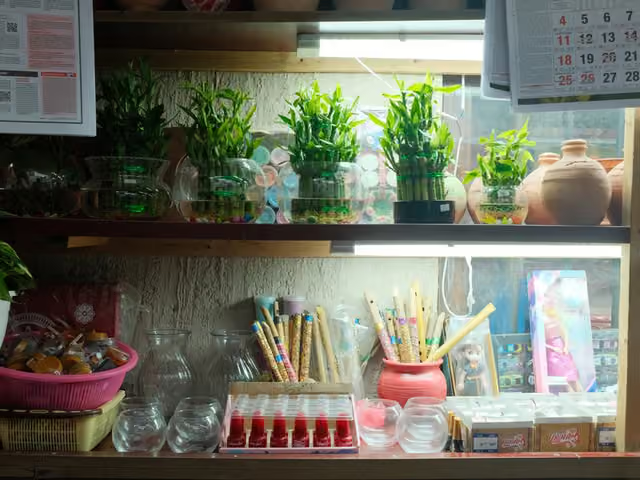
- Base: Classic Chrome
- Settings: DR400, H-2, S-2, Color +3, Clarity -1, Auto WB, R+2 B-6
- Best for: Sunny travel, coastal views, and everyday photography
- Watch out: Softer contrast can reduce architectural detail.

- Base: Astia / Soft
- Settings: DR400, H-2, S-2, Color +3, softened Clarity
- Best for: Rural greenery and outdoor portraits
- Watch out: Its gentle rendering may feel flat in gritty scenes.
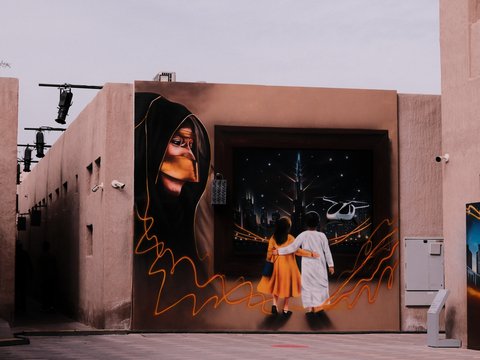
- Base: Classic Chrome
- Settings: Subdued highlights and shadows, cool WB shift, Weak grain
- Best for: Overcast streets and vintage-inspired travel photography
- Watch out: Not ideal for controlled studio lighting.
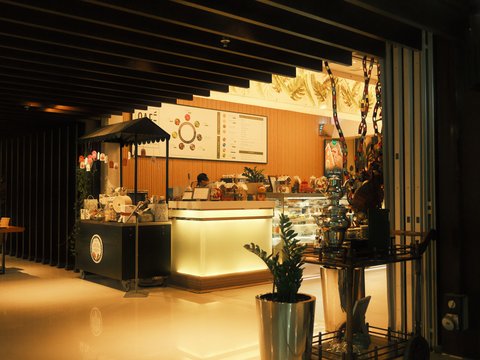
- Base: Classic Negative
- Settings: Gentle highlights, subtle cool-blue shift, rich color
- Best for: Neon signs and twilight street photography
- Watch out: Avoid it when you need neutral landscape greens.

- Base: Eterna / Cinema
- Settings: DR400, lowered highlights and shadows, cool-blue WB shift
- Best for: Controlled indoor lighting and video work
- Watch out: Can look too muted under harsh midday sunlight.
What these recipes offer:
- Classic Negative delivers rich urban colors through Marigold Afternoon and Warm Night.
- Classic Chrome creates softer travel tones through Portra Sol Chrome and Soft Gold Retro.
- Astia and Eterna offer gentler rendering for portraits and controlled lighting.
Open our X-Trans IV sensor page right now to copy every menu value for these fourth-generation recipes.
Best X-Trans V Recipes Built for 40MP and Fifth-Gen Bodies
Shooting an X-T5, X100VI, X-H2, X-T50, or X-E5 lets you tap into simulations older cameras simply never had. Our dedicated X-Trans V recipes take full advantage of Reala Ace, Nostalgic Negative, and fifth-generation blue rendering.
Here are six verified X-Trans V recipes from our 2026 catalog that showcase fifth-generation color:
- Base: Reala Ace
- Settings: H+1, S+1.5, Color -2, 6700K, R+1 B+4, Strong Large grain
- Best for: Everyday walks, portraits, and relaxed travel
- Watch out: Avoid extreme midday contrast.

- Base: Reala Ace
- Settings: Soft contrast, warm WB shift, subtle fine grain
- Best for: Sunny park walks, outdoor portraits, and cars
- Watch out: The WB shift can limit deep-blue sky tones.

- Base: Nostalgic Negative
- Settings: Relaxed shadows, cool WB shift, Strong grain
- Best for: Overcast urban streets and golden hour
- Watch out: Soft rendering can reduce fine architectural detail.

- Base: Nostalgic Negative
- Settings: Subdued highlights, warm vintage palette, Strong grain
- Best for: Street markets, amusement parks, and sunsets
- Watch out: Colors can oversaturate around neon signs.

- Base: Classic Negative
- Settings: DR400, S+2.5, Color +4, Clarity -3, Sharpness -2, Weak grain
- Best for: Golden-hour skylines and overcast streets
- Watch out: High saturation can shift studio skin tones.

- Base: Classic Chrome
- Settings: DR400, H-1.5, S-1, Color +3, Clarity -2, Auto WB, R+2 B-4
- Best for: Cafés, street scenes, and lush greenery
- Watch out: Softer shadows work best in natural light.
What these recipes offer:
- Reala Ace gives everyday photography and portraits a natural, warm finish.
- Nostalgic Negative creates vintage amber tones for streets and sunset scenes.
- Classic Negative and Classic Chrome provide alternative looks for urban and everyday photography.
X-Trans V recipes combine Reala Ace and Nostalgic Negative with forty-megapixel grain control for rich straight-out-of-camera JPEGs.
Check our golden hour recipes guide and our cloudy weather recipes guide for more fifth-generation test notes.
Why Online Recipes Fail When Copied Blindly Across Sensors?
Every week photographers complain that they copied twelve numerical settings online yet their photos look worlds apart. Four hidden factors explain why blindly copying settings between X-Trans IV vs X-Trans V leads to flat results.
Here are the four hidden traps that break recipes when you move them between cameras and scenes:
Trap 1: Ignoring the Sensor Blue Shift
When you copy a Classic Chrome or Classic Negative recipe from an X100V onto an X100VI, blues deepen. Leaving Color Chrome FX Blue at Strong on X-Trans V turns skies and shadow areas noticeably heavier. Always run cross-sensor settings through our free Fujifilm Recipe Converter on the tools page before saving them.
Trap 2: Mismatching the Creator’s Lighting
Light is the invisible core setting behind every recipe in the recipe catalog. Shooting a sunny summer recipe like Pro 160 Print inside a dim tungsten room produces muddy orange shadows. Conversely, using an overcast recipe like Eterna Projection under harsh midday sun lacks the contrast bright scenes demand.
Trap 3: Natural Live View and RAW Pitfalls
If you leave Natural Live View enabled in Screen Set-Up, your viewfinder hides film simulations and tone curves. Similarly, opening uncompressed RAF raw files in third-party editors strips away Color Chrome effects, clarity, and grain. Set your camera to Fine JPEG or RAW plus Fine JPEG and turn Natural Live View Off immediately.
How to Convert Recipes Between X-Trans IV and X-Trans V Now?
You never have to abandon your favorite fourth-generation looks after upgrading to a fifth-generation Fujifilm body. Following four simple translation rules lets you move any recipe forward or backward across Fujifilm sensor generations.
Here is how to adapt X-Trans IV recipes to X-Trans V and reverse the process cleanly:
- Lower Color Chrome FX Blue by one step when moving Classic Chrome or Classic Negative recipes onto X-Trans V.
- Raise Color Chrome FX Blue by one step when porting fifth-generation recipes back onto fourth-generation X-Trans IV bodies.
- Substitute PRO Negative Standard or Astia when moving a Reala Ace recipe onto an X100V or X-T4 body.
- Substitute Classic Chrome or Classic Negative with a +1 Red / -1 Blue shift when replacing Nostalgic Negative on IV.
- Omit Clarity and Grain Size while using separate white balance presets when porting down to an X-T3 or X-T30.
- Automate the entire translation in five seconds by pasting your recipe into our free Recipe Converter tool online.
Browse all six sensor generations on our Fujifilm Sensors hub to see which recipes work natively on your body.
Comparing Resolution, Grain, and Autofocus in Daily Use Now
Beyond color science, photographers weighing X-Trans IV vs X-Trans V want to know how daily handling feels. Resolution, film grain texture, subject-tracking autofocus, and custom slot memory all affect how many keepers you bring home.
Here is how the two sensor generations compare when you shoot street, travel, and family moments:
- Cropping flexibility on 40.2MP X-Trans V lets X100VI and X-T5 shooters use 1.4x and 2x digital teleconverters cleanly.
- 26.1MP X-Trans IV files still print huge wall art while taking up less SD card space and buffer.
- In-camera Grain Effect texture scales differently between twenty-six megapixel and forty-megapixel sensors when viewed at 100 percent.
- Large Strong grain on X-Trans V looks punchy and tactile in recipes like Expired Reala Warmth without mushing faces.
- AI Subject Detection autofocus on X-Processor 5 tracks eyes, birds, cars, and trains far more reliably than X-Processor 4.
- Per-slot White Balance Shift saving works on every X-Trans V body and late X-Trans IV bodies (X100V, X-T4, X-S10).
Explore our beginner recipe guide and our custom recipe building guide to set up your custom slots.
Should You Upgrade From X-Trans IV to X-Trans V?
Deciding whether to trade in a fourth-generation body or keep shooting it comes down to your personal priorities. Both Fujifilm sensor generations produce gorgeous straight out of camera JPEGs when paired with lighting-matched recipes.
Here is a clear checklist to help you decide whether to stay on X-Trans IV or upgrade:
- Keep your X-Trans IV camera if you love Classic Chrome and Classic Negative and rarely crop your frames heavily.
- Upgrade to X-Trans V if you want Reala Ace and Nostalgic Negative built directly into your camera menu.
- Choose a hybrid X-S20 or X-M5 if you want fifth-generation simulations and autofocus at a lighter 26.1MP file size.
- Pick the 40.2MP X100VI or X-T5 if you want IBIS stabilization, digital teleconverter crops, and seven C1-C7 recipe slots.
- Test new recipes first on our Fujifilm recipe finder before spending money on a new camera body.
Browse our 10 best travel recipes guide and our night photography recipes guide to get more from your current camera.
Final Steps
X-Trans IV and X-Trans V both deliver beautiful straight-out-of-camera JPEGs, but their colour rendering and available film simulations differ. The best choice comes down to your camera, preferred shooting style, and the looks you want to create. Whether you love the familiar tones of Classic Chrome or want to explore Reala Ace and Nostalgic Negative, the right recipe can make every shot more enjoyable.
Find your sensor. Find your signature look. Explore FujiPic Sensors.
FAQs
1. What Separates X-Trans IV From X-Trans V?
X-Trans IV uses a 26.1MP sensor with X-Processor 4, while X-Trans V offers 40.2MP HR or 26.1MP HS sensors. For JPEG recipe shooters, X-Trans V adds Reala Ace and Nostalgic Negative while rendering deeper blues in four modes. You can compare both hardware families side by side on our Fujifilm sensor generations page anytime.
2. Can I Use X-Trans IV Recipes on X-Trans V?
Yes, every X-Trans IV recipe can be loaded onto an X-Trans V camera like the X-T5 or X100VI. If the recipe uses Classic Chrome, Classic Negative, Eterna, or Bleach Bypass, lower Color Chrome FX Blue one step. Use our free Fujifilm Recipe Converter to get the exact translated values for your fifth-generation camera automatically.
3. Do X-Trans V Recipes Work on X-Trans IV Bodies?
X-Trans V recipes built on Classic Chrome, Classic Negative, Provia, Velvia, Astia, Eterna, or Acros work on X-Trans IV. Simply raise Color Chrome FX Blue by one step (Off to Weak, or Weak to Strong) to match blue skies. If the recipe uses Reala Ace or Nostalgic Negative, our converter maps it to the closest fourth-generation simulation.
4. Are the X-S20 and X-M5 X-Trans IV or V?
The Fujifilm X-S20, X-M5, and X-T30 III are hybrid cameras combining an X-Trans CMOS 4 sensor with X-Processor 5. Because X-Processor 5 controls JPEG color rendering and simulations, they include Reala Ace and Nostalgic Negative in-menu. When browsing recipes on FujiPic, treat those three hybrid cameras like X-Trans V bodies for color settings.
5. Does 40MP X-Trans V Have More High-ISO Noise?
At the pixel level, smaller 40.2MP photoreceptors show slightly finer grain than 26.1MP pixels when viewed at 100 percent. However, when both images are printed or viewed at the same output size, high-ISO noise performance is virtually identical. Plus, the 40.2MP X-Trans V HR sensor gives you a cleaner native base sensitivity of ISO 125 outdoors.
6. Why Does My X-T3 Lack Classic Negative Mode?
Although the X-T3 and original X-T30 use the X-Trans IV sensor, they launched in 2018 before Classic Negative existed. Fujifilm added Classic Negative, Clarity, and Color Chrome FX Blue on later X-Trans IV bodies starting with the X-Pro3. Check our Fujifilm cameras directory to see the exact simulation list supported by your specific camera model.
7. Does Grain Look Different on X-Trans V Sensors?
Both late X-Trans IV and X-Trans V bodies offer Weak or Strong grain strength paired with Small or Large size. Because X-Trans V HR packs 40.2 megapixels, Small grain looks slightly finer and more organic when zoomed in closely. Recipes like Expired Reala Warmth and Amarillo Negative are specifically tuned around fifth-generation grain rendering.
8. Which Sensor Generation Is Better for SOOC?
Neither sensor is strictly better because both produce iconic film looks when paired with recipes built for that hardware. X-Trans V wins on versatility by offering all twenty film simulations including Reala Ace and Nostalgic Negative. X-Trans IV remains unbeatable for value, giving you Classic Chrome, Classic Negative, and Eterna at lower used body prices.