Fujifilm Rainy and Overcast Day Recipes: Settings That Work
Fujifilm recipes for cloudy weather, with white balance, Dynamic Range, color, exposure, and rainy-day settings for JPEGs in soft, grey light.
Fujifilm recipes for cloudy weather can be a little frustrating when a recipe that looked great yesterday suddenly looks dull today. Sunny daylight gives you plenty of contrast and color, but grey skies can make the same settings look flat and muddy. Fuji X Weekly has also pointed out that many recipes are made with sunny daylight in mind, so this is something Fujifilm photographers run into fairly often.
The best Fujifilm recipes for cloudy weather are not necessarily special rainy-day recipes; they simply need settings that work with softer light. Here, we’ll look at four FujiPic recipes, what you can change when a recipe feels off, and how to use Fuji cloudy day settings without making things more complicated than they need to be.
We’ll go through the settings worth changing, compare four recipes for rainy and overcast days, and explain when to use different white balance and DR settings.
Best Fujifilm Recipes for Cloudy Weather at a Glance
The four Fujifilm recipes for cloudy weather worth checking are Softened Daylight, Astia Reverie, Bleached City Tone, and Muted Halo Stock, giving you different starting points depending on the kind of image you want to make when the light turns soft and grey.
Softened Daylight leans soft and natural, Astia Reverie suits a softer green-blue feel, while Bleached City Tone and Muted Halo Stock give you more muted, cinematic or dreamy results, with the supported sensor listed on each recipe page helping narrow down which options are available for your camera.
Here is the quickest match by look and sensor.
| Look you want | Recipe | Film simulation | Sensors on the recipe page |
| Soft and natural | Softened Daylight | Eterna | X-Trans IV and GFX |
| Soft and green-blue | Astia Reverie | Astia | X-Trans IV, V and GFX |
| Muted and cinematic | Bleached City Tone | Eterna Bleach Bypass | X-Trans V and GFX |
| Muted and dreamy | Muted Halo Stock | Eterna | X-Trans V and GFX |
For the full settings and camera compatibility, check each of the four recipe pages before loading one onto your camera.
Why Overcast Light Breaks Most Fujifilm Recipes?
Cloud cover makes the light softer, less contrasty, and often cooler than the direct sunlight most recipes are built around. That can leave Fujifilm film simulation recipes looking flat or muddy when you use them on cloudy days.
Here are the four problems you will notice first.
- Flat contrast: Soft, cloudy light removes strong shadows, so recipes built for sunlight can suddenly look washed out and lifeless.
- Cooler color cast: Cloudy conditions can shift the overall image cooler, making skin tones and other warm colors feel less inviting.
- Dull colors: Lower contrast and softer light can make colors lose their punch, especially with Fuji overcast recipes designed for brighter conditions.
- Blown or empty grey sky: A bright grey sky can take up much of the frame, while higher ISO can change how grain and noise reduction appear.
Fuji X Weekly also suggests that useful overcast recipes should handle grey skies, lower contrast scenes, and higher ISO shooting without losing their intended mood.
Pairing lower-contrast settings with more color and a careful white balance usually fixes most of it.
What to Change in a Recipe for Cloudy Day Settings?
Seven settings usually make the biggest difference when a recipe meets soft, grey light: white balance, Dynamic Range, color, shadow tone, clarity, grain and noise reduction, and exposure compensation.
Instead of changing everything at once, start with small adjustments, shoot a few frames on an actual grey day, and compare them with your usual recipe before deciding what needs changing.
Here is what to adjust and what our recipes do.
| Setting | What to try | Example from FujiPic recipes |
| White balance | Try Auto or Daylight first, then make a small warm shift when needed. See Fujifilm White Balance Shift Explained for how the shift works. | Softened Daylight uses Auto Ambience Priority with R-1 B-6. |
| Dynamic Range | Try DR100 in flat light, or DR200/DR400 when a bright sky risks clipping. | Softened Daylight uses DR200; the other three use DR400. |
| Color | A little more color can help when a recipe looks dull, while lower color keeps a muted look. | Softened Daylight +4; Astia Reverie +3; Muted Halo Stock +4; Bleached City Tone -2. |
| Shadow tone | Raise it when you want deeper shadows, or lower it when you want to keep the image softer. | Muted Halo Stock +2; Bleached City Tone -2. |
| Clarity | A negative setting can make the image feel softer, which can suit gentle cloudy light. | Muted Halo Stock -5; Softened Daylight -3. |
| Grain and noise reduction | Add grain when flat skies need more texture, while keeping noise reduction consistent during testing. | All four recipes use Noise Reduction -4. |
| Exposure compensation | Try a small positive adjustment when the scene feels too dark, then check highlights carefully. | Softened Daylight 0 to +2/3; Bleached City Tone -1/3 to +2/3. |
These are starting points for cloudy day settings, not official Fujifilm rules, so test each recipe in your own scene.
4 Fujifilm Recipes for Rainy and Overcast Days Compared
These four Fuji overcast recipes all use Noise Reduction -4 and the same Auto ISO ceiling, but their other settings are quite different. Every value below comes directly from the individual FujiPic recipe pages, so you can compare them without guessing.
Here are the core settings side by side.

- Simulation: Eterna
- Dynamic Range: DR200
- Highlight / Shadow: H-1 / S-1
- Color: +4
- Clarity: -3
- White Balance: Auto Ambience Priority, R-1 B-6
- Astia Reverie

- Simulation: Astia
- Dynamic Range: DR400
- Highlight / Shadow: H-1.5 / S-1
- Color: +3
- Clarity: -2
- White Balance: Auto White Priority, R+2 B-4
- Bleached City Tone
- Simulation: Eterna Bleach Bypass
- Dynamic Range: DR400
- Highlight / Shadow: H0 / S-2
- Color: -2
- Clarity: 0
- White Balance: Custom 4000K, R0 B-5
- Muted Halo Stock

- Simulation: Eterna
- Dynamic Range: DR400
- Highlight / Shadow: H0 / S+2
- Color: +4
- Clarity: -5
- White Balance: Fluorescent 3, R-6 B-4
All four cap Auto ISO at 6400 and use Noise Reduction -4.
Not sure which sensor your camera uses? Check the Fujifilm cameras page before choosing a recipe.
Soft and Natural Overcast Recipes
These two recipes keep skin and greens looking natural when the light is soft and overcast. Both work well for calm, low-contrast scenes where you want a gentler look without pushing everything too far.
Here are the two recipes and when to use each.
Softened Daylight (Eterna)
- Best for: Indoor and overcast scenes, with the recipe page specifically advising against harsh daylight.
- Sensors: X-Trans IV and GFX.
- Look: Soft, dreamy contrast with rich color, plus lowered highlights and shadows for a gentler finish.
- Watch out: It can look muted under bright sun, so it is better suited to softer overcast conditions.
- Exposure compensation: Start around 0 and move up to +2/3 when the scene looks slightly dark.
- Team note: Flag the white balance behavior for review because the page description and R-1 B-6 shift appear inconsistent.
Astia Reverie (Astia)
- Best for: Portraits and tranquil nature scenes, especially when greenery and soft, even lighting are involved.
- Sensors: X-Trans IV, V, and GFX.
- Look: Softer highlights and shadows, with greens and blues brought forward in the image.
- Watch out: Subdued shadows can sometimes lack punch, while the cooler cast may affect skin tones.
- Exposure compensation: Start at 0 and adjust up to +1 when needed during Fujifilm rainy photography.
For complete settings and supported cameras, see the Softened Daylight and Astia Reverie recipe pages.
Muted and Moody Overcast Recipes
Muted recipes take a different approach to grey light by working with it instead of trying to bring back the punch of sunshine. They can fit especially well with street scenes, architecture, and rainy frames where a quieter look makes sense.
Here are the two moodier options.
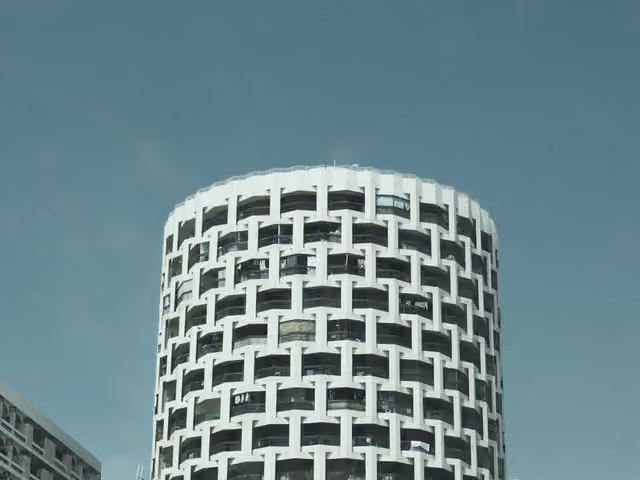
Bleached City Tone (Eterna Bleach Bypass)
- Sensors: X-Trans V and GFX.
- Settings snapshot: DR400, Color -2, Shadow -2, Grain Strong Small, Custom 4000K, R0 B-5.
- Look: The settings create desaturated, contrast-rich city tones. [INSERT TEAM TEST NOTE: camera, date, weather, what you saw]
- Exposure compensation: Use -1/3 to +2/3 depending on the scene and available light.
Muted Halo Stock (Eterna)
- Sensors: X-Trans V and GFX.
- Settings snapshot: DR400, Color +4, Clarity -5, Grain Strong Large, Fluorescent 3, R-6 B-4.
- Look: The very low Clarity setting is intended to give the image a soft, halo-like glow. [INSERT TEAM TEST NOTE: camera, date, weather, what you saw]
- Exposure compensation: Try -1/3 to +2/3 and adjust according to the scene.
Among Fuji overcast recipes, Fuji X Weekly has also highlighted an Eterna Bleach Bypass recipe as a personal cloudy-day favorite, making this simulation worth trying in rainy conditions.
Best White Balance and DR for Fujifilm Cloudy Days
For Fujifilm cloudy day settings, start with Auto or Daylight white balance and a small warm shift, then use DR100 unless bright highlights need more protection. Some recipes use DR400 by default because the extra range can give highlights a softer roll-off in difficult light.
Here is how to decide each setting.
- White balance
- Auto: Keeps white balance versatile when cloud cover and light conditions keep changing.
- Daylight: Keeps color more consistent when you are shooting through the same session.
- Small shift: Move slightly toward red and away from blue when the light looks too cool.
- Try the WB Shift Visualizer if you want to see these shifts before saving them.
- Dynamic Range
- DR100: Start here when the scene has no strong highlights, especially in flat, dull light.
- DR200: Move up when bright cloud or sky starts clipping, while remembering that minimum ISO rises.
- DR400: Use it when highlights are genuinely at risk and you need more room, with a higher minimum ISO.
- Recipe defaults: Softened Daylight uses DR200, while Astia Reverie, Bleached City Tone, and Muted Halo Stock use DR400.
- Check your body
- Minimum ISO requirements for DR200 and DR400 vary between Fujifilm camera bodies.
Several FujiPic recipes ship at DR400, so test both DR100 and the recipe default on a grey day before settling on one.
Fujifilm Rainy Photography: Practical Settings and Tips
Fujifilm rainy photography gets trickier because rain brings dim light, wet surfaces, moving droplets, and scenes that can change quickly. A few simple camera choices can help keep your JPEGs clean without making the shooting process complicated.
Here are the practical settings and habits.
- ISO: Let Auto ISO climb when needed, since these FujiPic recipes allow settings up to ISO 6400 for darker conditions.
- Shutter speed: Pick a speed that freezes droplets or shows rain streaks, depending on the effect you want.
- Exposure: A small positive compensation can stop wet grey scenes from looking darker than they appear.
- Subjects: Look for reflections, umbrellas, glowing signs, puddles, and wet streets that naturally add interest after rain.
- Gear care: Check your camera and lens weather-resistance instructions, and wipe moisture away before it collects.
- Recipe slot: Save a custom Fujifilm recipe in a Custom Setting so it is ready when rain starts.
Thick overcast often pushes ISO higher, but Fuji X-Trans processing generally handles these conditions well, according to Fuji X Weekly. Keep your rain setup simple, save it in advance, and you will spend less time changing settings when weather shifts.
Shooting through changing weather on a trip? These Fujifilm travel recipes can give you more everyday options beyond cloudy and rainy scenes.
Cloudy Day Recipe Mistakes to Avoid
Most cloudy day problems start when you take a recipe built for sunshine and use it unchanged under grey skies. The good news is that a few small changes can usually get your Fuji cloudy day settings back on track.
Here are the four mistakes to avoid.
- Using a sun-tuned recipe with strong warm shifts: Ease back the warm shift when skin tones or scenes start looking overly warm in dreary light.
- Leaving DR400 on for flat light without testing DR100: Try DR100 when there are no strong highlights, then compare both settings on your cloudy scene.
- Underexposing grey scenes until they turn muddy: Add a little positive exposure compensation when the whole frame looks darker than the scene.
- Loading a recipe made for a different sensor: Check the recipe page first, because X-Trans V can render some blues differently between simulations.
A warm recipe can sometimes feel too warm on dreary days, while X-Trans V bodies may also render blue more deeply with certain simulations.
Related: Use the Recipe Converter to adapt a recipe when your camera uses a different sensor generation.
Load a Cloudy Day Recipe Before the Rain Starts
Fujifilm recipes for cloudy weather do not need to be complicated; raise color or embrace muted tones, use Auto or Daylight, and start with DR100 unless the sky clips. The main thing is choosing a recipe that actually fits your camera’s sensor and the kind of look you want.
Before the next grey day arrives, pick a soft or moody recipe that works with your sensor and save it to a Custom Setting slot. When you get outside, shoot the same scene at DR100 and the recipe’s default DR setting, then see which version looks right to you.
That is really all you need to get started.
Browse the Fujifilm recipes, explore the free tools at tools, and join 4,200+ Fujifilm photographers on the newsletter for new recipes every week.
Frequently Asked Questions
- What is the best Fujifilm recipe for cloudy weather?
It depends on your look, with Softened Daylight or Astia Reverie for softer images and Bleached City Tone or Muted Halo Stock for moodier results.
- What white balance is best for cloudy days on Fujifilm?
Auto or Daylight both work well, with a small shift toward red and away from blue when the scene feels too cool.
- Should I use DR100 or DR400 on a cloudy day?
Use DR100 for flat scenes without strong highlights, then consider DR200 or DR400 when bright skies need more highlight protection.
- What film simulation works best in rain?
Eterna, Eterna Bleach Bypass, and Astia all appear in these picks, so choose one based on your scene and preferred look.
- Why do my Fujifilm photos look flat on cloudy days?
Cloudy light naturally has lower contrast, so raising color slightly and adjusting highlight or shadow tone can help restore some depth.
- Can I use a sunny day recipe on a cloudy day?
Yes, and small changes to white balance, color, and exposure compensation can help the recipe work better under grey skies.
- Will these recipes work on my camera?
Check the supported sensor first, then use the Recipe Converter when adapting settings between different X-Trans generations.
- What ISO should I use for rainy photography?
Let Auto ISO rise as needed up to 6400, balancing the extra grain against the shutter speed needed for moving subjects.