Kodachrome Fujifilm Recipe Guide for Timeless Slide Colors
Discover the best Kodachrome Fujifilm recipe! Compare Kodachrome Fuji recipe settings, Fujifilm vintage recipe tips, and film simulation recipe charts now.
Few analog emulsions command the reverence of a Kodachrome Fujifilm recipe when photographers travel or walk sunny city streets. Introduced by Eastman Kodak in 1935 and retired in 2009, real Kodachrome was a color reversal slide transparency film. Unlike forgiving negative print film, a true Kodachrome Fuji recipe combines crisp primary reds with deep, ink-black shadows.
Whether you own a vintage X-Trans II body or a 40-megapixel camera, choosing the right Fujifilm vintage recipe matters. This complete film simulation recipe guide compares five verified Kodachrome and slide setups from the FujiPic library. You will also learn how to expose narrow slide latitude and load unedited gallery looks into your custom slots.
How Kodachrome Reversal Slide Film Differs From Print Film?
Many photographers confuse a Kodachrome Fujifilm recipe with consumer negative stocks like Kodak Gold 200 or Ultramax 400. Because Kodachrome 64 and Kodachrome 25 were positive transparency slides developed in K-14 chemistry, their tonality behaves differently.
Here are the five visual signatures that separate a Kodachrome slide look from color negative print film:
- Narrow reversal slide exposure latitude demands protecting bright highlights first instead of overexposing shadows like negative print stocks.
- Deep graphic shadow density anchors architectural frames and street scenes with rich blacks rather than lifted pastel gray.
- Archival documentary primary colors make crimson signage, yellow taxicabs, and weathered brick pop without artificial digital neon saturation.
- Restrained cyan-blue sky rendering replaces electric navy blues with calm, mid-century magazine hues powered by Classic Chrome.
- Ultra-fine archival grain structure reflects Kodachrome’s legendary resolving power where edges stay sharp and micro-contrast feels tactile.
Read our Complete Guide to Fujifilm Film Simulations to see how Fujifilm engineered Classic Chrome around documentary magazine slides.
Five Kodachrome-Inspired Recipes for Different Shooting Conditions
Kodachrome-inspired recipes don’t all produce the same look. Some favour warm travel colours, while others bring deeper shadows, softer twilight tones, or more vibrant slide-style saturation. Here are five options to explore, with different film simulations and camera compatibility.
1. Kodak Timeless Chrome: For Everyday Travel Photography
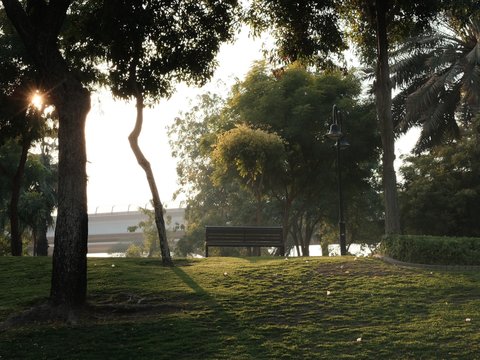
Kodak Timeless Chrome combines Classic Chrome with warm colours and softened highlights and shadows. It’s a versatile option for sunny street walks, colourful markets, and golden-hour travel photography.
Base simulation: Classic Chrome
Compatible sensors: X-Trans II, III, IV and V.
Explore the Kodak Timeless Chrome recipe.
2. Kodacolor Chrome: For Warm Evening Photography

Kodacolor Chrome uses Classic Chrome with DR400, restrained colour, and Strong Small grain. Its warm white balance treatment gives evening architecture and outdoor scenes a nostalgic film character.
Base simulation: Classic Chrome
Compatible sensors: X-Trans IV, X-Trans V and GFX.
Explore the Kodacolor Chrome recipe.
3. Kodachrome Shade: For Open Shade and Overcast Scenes

When direct sunlight disappears, Kodachrome Shade offers a different approach to Classic Chrome. Its Shadow -4 setting and warm white balance shift help open darker areas while retaining a distinctive vintage colour treatment.
Base simulation: Classic Chrome
Compatible sensors: X-Trans IV, X-Trans V and GFX.
Explore Kodachrome Shade
4. Kodak Warm Slide: For Soft Twilight Colours

Kodak Warm Slide uses Astia / Soft to create a gentler slide-inspired look. Its warm twilight white balance and soft grain make it a good option for evening portraits and reflective city scenes.
Base simulation: Astia / Soft
Compatible sensors: X-Trans IV, X-Trans V and GFX.
Explore the Kodak Warm Slide recipe.
5. Kodak Vivid Slide: For Saturated Landscapes and Outdoor Scenes
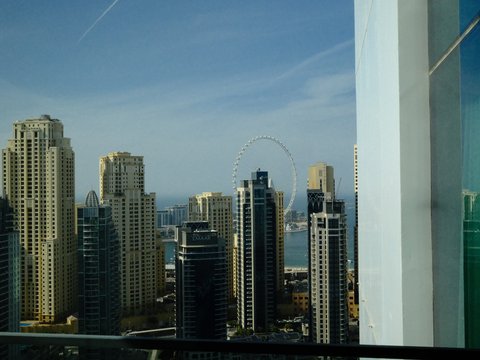
Kodak Vivid Slide uses Velvia to bring stronger saturation and contrast to outdoor photography. Its DR400 settings and Color Chrome effects add depth to colourful landscapes and bright travel scenes.
Base simulation: Velvia / Vivid
Compatible sensors: X-Trans IV, X-Trans V and GFX.
Explore the Kodak Vivid Slide recipe.
Kodak Timeless Chrome brings warm, mid-century Kodachrome slide colors to street and travel photography on Classic Chrome.
Browse all five slide setups and ninety-one verified looks on our Fujifilm Recipes page right now.
Universal Kodachrome 64 Film Simulation Recipe Master Card
If you want one all-purpose Kodachrome 64 setup for C1, you need precise Classic Chrome tone and shift numbers. This classic film simulation recipe balances warm R/B grid coordinates with crisp edge acuity and rich shadow contrast.
Here is the complete menu-order specification table for programming Kodachrome 64 across X-Trans IV, X-Trans V, and older bodies:
| Menu Parameter | X-Trans IV Setting (X100V, X-T4, X-Pro3) | X-Trans V Setting (X100VI, X-T5, X-T50) | X-Trans II / III Setting (X-T1, X-T2, X100F) |
| Film Simulation | Classic Chrome | Classic Chrome | Classic Chrome (via Kodak Timeless Chrome) |
| Dynamic Range | DR200 (or DR400 in harsh midday sun) | DR200 (or DR400 in harsh midday sun) | DR200 (Auto ISO 400-3200) |
| Grain Effect | Weak, Small | Weak, Small | Weak (or Off on X-Trans II) |
| Color Chrome Effect | Strong | Strong | Skip (not on sensor menu) |
| Color Chrome FX Blue | Weak | Off (or Weak for deeper skies) | Skip (not on sensor menu) |
| White Balance & Shift | Daylight or Auto (R +2 / B -4) | Daylight or Auto (R +2 / B -4) | Daylight (R +2 / B -3) |
| Highlight & Shadow | Highlight 0 (or +0.5), Shadow +1.5 | Highlight 0 (or +0.5), Shadow +1.5 | Highlight 0, Shadow +1 |
| Color, Sharpness & NR | Color +1, Sharpness +1, NR -4 | Color +1, Sharpness +1, NR -4 | Color +1, Sharpness +1, NR -2 |
| Clarity | Clarity +1 (or 0 for zero lag) | Clarity +1 (or 0 for zero lag) | Skip (not on sensor menu) |
Check our Fujifilm Color Chrome Effect guide to see how Strong Chrome adds slide density to reds and yellows.
How to Meter and Expose Narrow Slide Latitude With Recipes?
Shooting a Kodachrome Fujifilm recipe requires changing how you use your physical exposure compensation dial in sunlight. While negative print recipes love +2/3 stop overexposure, reversal slide recipes look best when you protect highlights.
Here are the four exposure and lighting rules that make a Kodachrome Fuji recipe look unmistakably authentic:
- Guard your highlights first (-1/3 to 0 EV) whenever bright white clouds, sunlit shirts, or chrome bumpers enter the frame.
- Blown digital highlights break the illusion of K-14 slide film faster than any other mistake.
- Embrace directional side light during mid-morning and late afternoon when crisp shadows carve out street geometry.
- Let dark alleys and doorways fall into rich black shadow instead of lifting them in post-processing.
- Switch to Kodachrome Shade in flat light when overcast skies or deep building canyons make Shadow +1.5 too dark.
- Dropping Shadow to -4 with Color +2 restores open shadow detail while keeping warm Classic Chrome color.
- Frame red, yellow, and blue subjects against neutral concrete or stone so primary colors command immediate attention.
Kodacolor Chrome channels mid-century Kodachrome hues on Classic Chrome with DR400 and strong small grain.
Explore our 10 Best Fujifilm Travel Recipes guide to pair your Kodachrome slot with everyday holiday stocks.
Adapting Kodachrome 25, 64, and 200 Across Sensor Eras Now
Eastman Kodak produced three famous speeds of Kodachrome—ISO 25, ISO 64, and ISO 200—each with distinct grain. You can tailor your Fujifilm vintage recipe to mimic all three film speeds while matching your camera sensor generation.
Here are the three classic speed variations and cross-sensor conversion rules for every Fujifilm camera body:
- Kodachrome 25 Ultra-Fine Daylight Setup
Real Kodachrome 25 was famous for having virtually invisible grain and razor-sharp resolution under bright coastal or mountain sun. To mimic KM25 on your Fujifilm camera, turn Grain Effect completely Off or Weak Small with Sharpness plus two. Lock your sensitivity at base ISO 125 or ISO 160 in DR100 and meter carefully for sunlit highlights.
- Kodachrome 64 Documentary Street Standard
Kodachrome 64 was the workhorse slide stock of National Geographic photojournalists from the mid-1970s through the 2000s. Use our Universal Kodachrome 64 table above or load Kodak Timeless Chrome with Weak Small grain and DR200. It balances warm skin tones, deep cyan skies, and punchy reds across street markets, festivals, and travel portraits.
- Kodachrome 200 and X-Trans V Sensor Tuning
Photographers who loved the gritty, coarse texture of Kodachrome 200 should load Kodacolor Chrome with Strong Small grain. If you shoot a fifth-generation X-Trans V camera like the X100VI or X-T5, remember Classic Chrome renders deeper blues. Run your settings through our free Fujifilm Recipe Converter to step down Color Chrome FX Blue automatically.
Read our Fujifilm X100V Recipes guide to see how fourth-generation leaf-shutter bodies render Classic Chrome street scenes.
Pairing Kodachrome With Golden Hour and Monochrome Recipes
A single film simulation recipe cannot cover harsh midday architecture, soft sunset portraits, and high-contrast monochrome street walks. Building a balanced C1 through C7 bank around your Kodachrome Fujifilm recipe keeps you ready for changing light.
Here is how to organize your seven custom slots around your primary Kodachrome slide setup today:
- Slot C1 (All-Day Sunny Slide): Load Kodak Timeless Chrome or Kodachrome 64 for bright street and travel photography.
- Slot C2 (Open Shade & Overcast Slide): Load Kodachrome Shade (Shadow -4, Color +2) when clouds roll in.
- Slot C3 (Twilight & Dusk Reflections): Load Kodacolor Chrome or Kodak Warm Slide for serene blue-hour cityscapes.
- Slot C4 (Punchy Landscape Chrome): Load Kodak Vivid Slide on Velvia when coastal cliffs demand extra saturation.
- Slot C5 (Archival Black & White): Pair your slide slots with Kodak Silver Mono on Acros for timeless monochrome frames.
Read our 5 Best Fujifilm Golden Hour Recipes guide to add dedicated sunset warmth to your custom slots.
FAQs
1. Which Simulation Is Closest to Real Kodachrome?
Classic Chrome is Fujifilm’s dedicated documentary simulation engineered to echo the restrained skies and deep shadows of 20th-century slide magazines. While Fujifilm stresses it is not a direct trademarked copy, Classic Chrome shares Kodachrome’s cyan-leaning blues and crisp contrast. Adding a warm R +2, B -4 white balance shift and Strong Color Chrome completes the archival K-14 palette.
2. What Is the Best Kodachrome Recipe on FujiPic?
For vibrant everyday street and travel photography across all X-Trans generations, start with Kodak Timeless Chrome on Classic Chrome. If you prefer muted, pastel-leaning mid-century tones with strong grain at dusk, load Kodacolor Chrome with DR400. For soft twilight portraits or punchy landscapes, try Kodak Warm Slide on Astia or Kodak Vivid Slide on Velvia.
3. How Does Kodachrome Differ From Kodak Gold 200?
Kodak Gold 200 is a consumer color negative print film with wide exposure latitude and creamy yellow-gold highlights. Kodachrome is a positive color reversal slide film with narrow highlight latitude, steeper shadow contrast, and sharper edge detail. Expose Kodak Gold 200 slightly bright (+1/3 to +2/3 EV), but expose Kodachrome recipes at 0 or -1/3 EV.
4. Can I Use Kodachrome Recipes on Older Cameras?
Yes, Classic Chrome debuted on X-Trans II cameras like the X-T1, X100T, and X-E2s over a decade ago. Our Kodak Timeless Chrome recipe is verified specifically for X-Trans II and X-Trans III bodies without needing newer menu items. Simply dial in the Classic Chrome simulation, warm white balance shift, and tone curve settings to shoot immediately.
5. Why Does My Kodachrome Recipe Look Too Dark?
Traditional Kodachrome 64 recipes use Shadow +1 to +2 to replicate the dense black shadows of reversal slide film. When you step out of direct sunlight into open shade or overcast alleys, that steep shadow curve crushes detail. Switch to our Kodachrome Shade setup, which drops Shadow to minus four and boosts Color to plus two.
6. Should I Use DR200 or DR400 for Slide Recipes?
In moderate morning or golden hour light, DR200 at ISO 320 or 400 preserves authentic slide punch and contrast. Under harsh midday sun or high-contrast city reflections, switch to DR400 as used in Kodacolor Chrome and Kodak Vivid Slide. DR400 gives your highlights an extra stop of protection so white clouds and buildings never clip to blank white.
7. How Do I Avoid Clarity Lag in Street Shooting?
Many vintage recipes set Clarity to plus one or minus two, which causes a brief black-screen processing pause. Because Kodachrome relies on crisp micro-contrast rather than dreamy halation, you can safely set Clarity to zero. Setting Sharpness to plus one or plus two with Weak Small grain preserves crisp slide definition at full burst speed.
8. How Can I Match an Old Slide Photo to a Recipe?
If you have a digitized family Kodachrome slide or a reference street photo you love, visit FujiPic Find. Upload that reference image into our visual matcher to analyze its color distribution, shadow depth, and warm cast. The tool instantly ranks the closest verified film simulation recipes from our ninety-one recipe library for your camera.