Which Fujifilm Film Simulation Works Best for Every Scene?
Wondering which Fujifilm film simulation should I use in 2026? Open our free Fuji film simulation picker and read this Fujifilm simulation guide today.
Standing on a busy street and asking which Fujifilm film simulation I should use happens to every photographer. Modern Fujifilm cameras pack twenty distinct simulations inside the menu, which quickly causes decision fatigue outdoors. Fuji film simulation picker solves that menu paralysis by matching your shoot in thirty seconds. Instead of guessing randomly, this practical Fujifilm simulation guide maps every mode to real lighting situations.
You will discover the best film simulation for photography across portraits, street walks, landscapes, and night scenes. Every recommendation below also includes where each simulation fails so you never ruin skin tones or bright skies.
Quick Decision Tree for Choosing Your Film Simulation
When you ask which Fujifilm film simulation should I use, you want a fast field answer before light changes. Reading this top-to-bottom decision tree lets you stop at the very first row that matches your scene.
Here are the eight instant scene matches from our Fuji film simulation picker decision tree:
- Natural outdoor portraits look best when you start with Reala Ace on fifth-generation bodies or Astia on older cameras.
- Toning down Astia saturation is easy when you switch to PRO Negative High for crisper editorial skin tones.
- Gritty skin texture comes alive when you load a Superia-inspired setup on Classic Negative with weak small grain.
- Black and white street scenes pop with Acros Red filter for drama or Acros Yellow for balanced documentary work.
- Vibrant nature landscapes shine on Velvia for lush foliage or Classic Chrome when you prefer muted travel colors.
- Golden hour walks glow on Classic Negative for fourth-generation cameras or Nostalgic Negative on newer X-Processor 5 bodies.
- X-Trans IV camera owners without Reala Ace should select PRO Negative High or Astia for clean everyday colors.
- Older X-Trans I and II bodies work best using Provia, Velvia, Astia, PRO Negative, and Monochrome bases.
Answer five quick questions inside our free Fuji film simulation picker to get three matched recipes in thirty seconds.
How Our Free Fuji Film Simulation Picker Works in Practice?
Our browser-based Fuji film simulation picker turns a twenty-option camera menu into five simple visual questions. Every click updates your recommended base simulation immediately and pairs it with three tested recipes from our library.
Here are the five real-world shooting questions you answer inside the picker tool before pressing your shutter:
Question 1: Pick Your Exact Subject Matter
First, tap what is standing in front of your lens right now, such as Portraits, Street, Landscape, or Travel. You can also choose specialized subjects including black and white documentary, night neon, sports, architecture, or product shots. Selecting your subject immediately eliminates simulations that clash with your scene, like using Velvia on close portrait faces.
Question 2: Choose Color or Black and White
Second, decide whether your story needs color chemistry or the silver-halide tonal structure of monochrome film. Picking color keeps eleven distinct color simulations active, ranging from neutral Provia to high-contrast Eterna Bleach Bypass. Picking black and white narrows your focus to Acros, Monochrome, their optical color filter variants, and warm Sepia.
Question 3: Match Mood, Light, and Skin Priority
Next, select your desired mood from seven options like Neutral, Vintage Warm, Vintage Cool, Vibrant, or Cinematic Flat. Then tell the Fuji film simulation picker whether you are shooting under natural daylight or indoor artificial lamps. Finally, toggle whether flattering skin tones are a priority so the tool protects faces from harsh magenta casts.
Read our 2026 beginners recipe guide and to see how simulations shape raw sensor data.
Complete Fujifilm Simulation Guide at a Single Glance
Sometimes you just need a side-by-side cheat sheet comparing saturation, contrast, and skin rendering across every mode. This Fujifilm simulation guide table lets you scan all fourteen primary modes before opening your camera menu.
Here is how Fujifilm’s core color and monochrome simulations compare across saturation, contrast, skin, and best use:
| Film Simulation | First Seen | Saturation Level | Contrast Curve | Skin Rendering | Best Shooting Application | Where It Fails |
| Reala Ace | 2023 (GFX100 II) | Moderate (3/5) | Moderate-Firm (3/5) | Natural & True | Everyday default, family, travel, portraits | Unavailable on X-Trans IV and older |
| Provia / Standard | 2002 (All bodies) | Balanced (3/5) | Balanced (3/5) | Neutral-Warm | General documentary, custom recipe base | High-contrast midday landscapes |
| Velvia / Vivid | 2002 (All bodies) | Maximum (5/5) | High (4/5) | Warm (Clips reds) | Autumn foliage, seascapes, red rock canyons | Portraits and flat overcast skies |
| Astia / Soft | 2003 (All bodies) | Moderate (3/5) | Soft (2/5) | Flattering Warm | Outdoor natural-light portraits, weddings | Dramatic rugged landscapes |
| Classic Chrome | 2014 (X30) | Muted (2/5) | Medium-High (3/5) | Neutral-Cool | Street reportage, travel, Portra recipes | Lush green nature landscapes |
| PRO Neg. Std | 2012 (X-Pro1) | Low (2/5) | Lowest (1/5) | Maximum Fidelity | Controlled studio flash portraits, grading | Unedited punchy SOOC street shots |
| PRO Neg. Hi | 2012 (X-Pro1) | Moderate (3/5) | Medium (3/5) | Clean Neutral | Outdoor editorial portraits, fashion | Vivid nature and sunset scenes |
| Classic Negative | 2019 (X-Pro3) | Moderate (3/5) | High (4/5) | Warm / Magenta cast | Cinematic street, travel, Superia recipes | Studio portraits needing neutral skin |
| Nostalgic Neg. | 2021 (GFX100S) | Moderate (3/5) | Medium (3/5) | Warm Amber glow | Golden hour, family albums, warm lamps | Cool blue-hour and dreary overcast |
| Eterna / Cinema | 2018 (X-H1) | Muted (2/5) | Flat (2/5) | Neutral-Soft | Mixed-light interiors, video, cinema stills | Punchy social-ready sunny frames |
| Eterna Bleach Bypass | 2020 (X-T4) | Minimal (1/5) | Extreme (5/5) | Cool / Metallic | Brutalist architecture, gritty urban streets | Any shoot needing accurate color |
| Acros (+Ye / +R / +G) | 2016 (X-Pro2) | Monochrome | Rich-High (4-5/5) | Fine ISO-scaled grain | Street documentary (+Ye), dramatic skies (+R) | X-Trans I/II bodies (use Monochrome) |
Want to see unedited sample JPEGs for each mode? Browse our 91 verified Fujifilm recipes filtered by simulation.
Best Film Simulation for Photography on Everyday Walks Now
Choosing the best film simulation for photography during daily walks means balancing natural skin with lively street color. Three simulations handle ninety percent of casual travel, café scenes, and weekend family outings without needing desktop edits.
Here is how to apply Reala Ace, Provia, and Classic Chrome during your everyday and travel shoots:
- Reala Ace: The Everyday Default Pick

Debuting on the GFX100 II and arriving on the X100VI, X-T50, X-S20, and X-M5, Reala Ace mimics Reala 100. It delivers slightly punchier contrast and richer saturation than PRO Negative Standard while keeping faces completely honest. Load FujiPic recipes like Expired Reala Warmth, Pro 160 Print, or Pro Daylight Kodak for effortless daily shooting.
- Classic Chrome: The Reportage Travel Staple
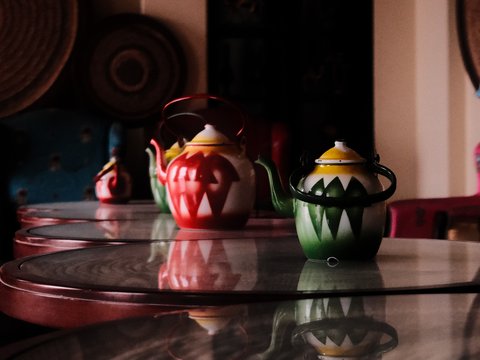
Added on the X30 in 2014, Classic Chrome pulls saturation down, cools greens, and lifts shadows into deep charcoal. Because its baseline is restrained, you can push warm Red and Blue white balance shifts without clipping colors. Try verified FujiPic travel favorites like Portra Sol Chrome, Kodak Softlight, or Soft Gold Retro on sunny walks.
- Provia: The Neutral Recipe Starting Point

Named after Fujifilm RDP-III slide film, Provia ships on every digital body as the balanced Standard color profile. It renders greens slightly cooler than Astia and keeps shadows a touch deeper than Reala Ace in daylight. Use Provia whenever you want a clean baseline that accepts custom tone curves without fighting the underlying simulation.
Note: Portra Sol Chrome on Classic Chrome softens sunny coastal highlights while warming everyday travel scenes straight out of camera.
Explore our 10 best travel recipes guide and our X100VI starter recipes guide for ready-to-save travel slots.
Which Fujifilm Film Simulation Should I Use for Portraits?
Portrait photographers asking which Fujifilm film simulation should I use must separate natural outdoor light from controlled studio flash. Picking a high-contrast street mode under studio strobes causes red blotches on cheeks and harsh shadow transitions.
Here are the four portrait-friendly simulations and the exact lighting setups where each one shines:
- Astia / Soft lifts shadows gently and pulls back reds so lips and cheeks never blow out outdoors.
- Where Astia shines is outdoor wedding, engagement, and family portraiture under open sky or warm afternoon shade.
- Verified FujiPic recipe Astia Reverie pairs Astia with DR400 and softened clarity for calm rural and garden portraits.
- PRO Negative Standard delivers the lowest contrast in the entire lineup for maximum studio skin tone accuracy.
- Where PRO Neg Std shines is controlled studio flash or strobe sessions where you plan light grading later.
- Verified FujiPic recipe Warm Amber uses PRO Negative Standard with DR400 and Shadow plus three for studio warmth.
- PRO Negative High shares the exact same neutral skin palette as Standard but adds crisp editorial contrast.
- Where PRO Neg Hi shines is outdoor portrait sessions when Astia feels too warm or saturated for fashion.
- Reala Ace on newer cameras balances lifelike skin reproduction with lively background colors in bright, even outdoor light.
Check our JPEG versus RAW guide to keep portrait skin tones natural.
Best Simulations for Street, Golden Hour, and Night Shoots
When afternoon light turns golden or neon signs flick on, neutral simulations can feel too polite and clinical. Fujifilm’s mood-driven negative and cinema modes inject nostalgic warmth, amber shadows, or gritty silver contrast right at capture.
Here are the four character simulations that transform urban streets, golden sunsets, and rainy night walks:
- Classic Negative for Superia Street Punch
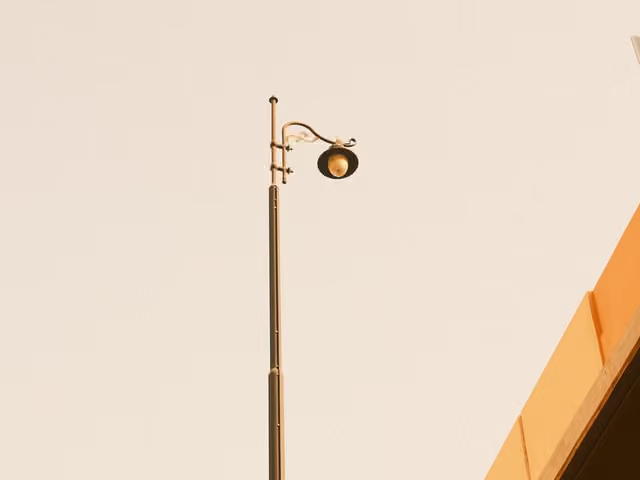
Introduced on the X-Pro3 in late 2019, Classic Negative mimics Fujicolor Superia consumer film with warm midtones. It leans shadows slightly toward magenta while lifting deep blacks just enough to create a chemical film glow. Load FujiPic recipes like Vintage Amber, Warm Night, or Vintage Lamplight Tone for moody city streets.
- Nostalgic Negative for Seventies Amber Glow

Available on GFX100S and all X-Processor 5 cameras, Nostalgic Negative pushes warm amber into shadows instead of magenta. Frames look like a 1970s family album aged in a shoebox, especially during golden hour or under tungsten lamps. Try verified FujiPic recipes like Amarillo Negative, Summer ’76, Retro Summer, or Midnight Filament outdoors.
- Eterna and Bleach Bypass for Cinema Grit
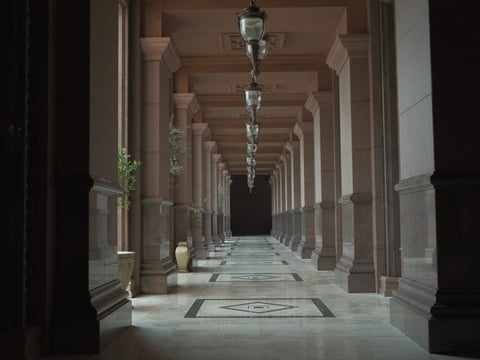
Eterna uses a flat motion-picture tone curve that protects mixed-light street scenes where Classic Chrome crushes dark shadows. When you want hard-edged silver retention with collapsed saturation, Eterna Bleach Bypass delivers dramatic industrial and architectural grit. Load Eterna Projection for overcast interiors or Bleached Gold for molten golden-hour waterfronts and gritty streets.
Choosing Velvia or Acros for Vibrant Landscapes and Street
Pure landscape and monochrome shooters need simulations that maximize tonal separation across skies, foliage, and architectural textures. Knowing when to push color with Velvia or strip color away with Acros elevates outdoor frames immediately.
Here is how to apply Velvia and the four Acros monochrome variants across nature and street scenes:
- Velvia / Vivid boosts greens, blues, and reds aggressively while pulling shadows deep like classic Velvia 50 slide film.
- Pulling Highlight down to minus one or minus two on Velvia protects bright clouds during sunny mountain hikes.
- Acros Yellow (+Ye) moderately darkens blue skies and lifts foliage while keeping skin tones natural for everyday documentary.
- Acros Red (+R) turns blue skies almost black for high-drama Ansel Adams landscapes and stark minimalist architecture.
- Acros Green (+G) boosts skin contrast and darkens lips slightly, making it the classic choice for monochrome portraits.
- Verified FujiPic recipe Deep Acros Mono uses Acros Yellow with strong grain for gritty street and architectural frames.
Note: In-camera Fujifilm film simulations shape tonal curves, sky density, and grain structure directly inside the JPEG processor.
Have a sample photo whose mood you want to copy? Upload it to our free Fujifilm Recipe Finder now.
How Camera Sensors Limit Which Simulations You Can Use Now?
Before you fall in love with a simulation, check whether your specific camera processor includes that mode in-menu. Fujifilm ties its twenty film simulations to processor generations across X-Trans I through V and GFX medium format.
Here is what your camera generation supports and how to adapt when a simulation is missing:
- X-Processor 5 cameras (X100VI, X-T5, X-H2, X-T50, X-E5, X-S20, X-M5) include all twenty simulations including Reala Ace.
- X-Trans IV cameras (X100V, X-T4, X-Pro3, X-S10, X-E4) include Classic Negative and Eterna but lack Reala Ace.
- Early X-Trans IV bodies (X-T3 and original X-T30) include Eterna and Acros but lack Classic Negative and Clarity.
- X-Trans III bodies (X-T2, X-Pro2, X100F) introduced Acros in 2016 but do not have Eterna or Classic Negative.
- Converting across sensors on our free Fujifilm Recipe Converter maps missing simulations and Color Chrome FX Blue automatically.
Common Mistakes to Avoid When Picking Film Simulations Now
Even the best film simulation for photography will disappoint if you pair it with conflicting lighting or camera settings. Avoiding five common field mistakes guarantees your LCD preview matches the final JPEG saved to your memory card.
Here are the five pitfalls that trip up Fujifilm photographers when testing film simulations outdoors:
- Shooting Velvia on portraits clips red channels on cheeks and noses, so switch to Astia or Reala Ace.
- Using Nostalgic Negative in blue hour overpowers cool twilight atmospheres with heavy amber casts that muddy shadows.
- Expecting Eterna to pop unedited leaves sunny street shots looking flat unless you boost Color and Shadow tone.
- Leaving Natural Live View turned On hides your film simulation on the LCD screen until after you shoot.
- Using Monochrome instead of Acros on newer cameras sacrifices Acros’s ISO-scaled organic grain and deep midtone separation.
Read our DR400 vs DR200 guide and our X100V settings guide to protect highlights on every simulation.
Final Steps
Stop scrolling through twenty menu rows while your subject waits and let a structured 3-slot setup do the work. Saving one everyday simulation, one warm street recipe, and one Acros monochrome slot covers almost any shoot.
Here is your three-step action plan to set up your camera before heading out the door today:
- Run the 30-second quiz inside our free Fuji film simulation picker to get your top simulation and three starter recipes.
- Check your camera hardware on our Fujifilm cameras page and sensors guide to see every mode your body supports.
- Save three custom slots from the FujiPic recipe library and explore more field guides on the FujiPic blog now.
Find your perfect Fujifilm look with our free Film Simulation Tools and start shooting with confidence.
FAQs
1. Which Fujifilm Film Simulation Should I Use?
For everyday color on newer bodies, start with Reala Ace, or use Provia and Astia on older cameras. Pick Classic Chrome for documentary street and travel, Classic Negative for cinematic warmth, and Velvia for vivid nature landscapes. Open our free Fuji film simulation picker to get an instant recommendation matched to your exact shoot.
2. Classic Chrome vs Classic Negative: Which Wins?
This is cooler, more muted, and built for documentary reportage with deep charcoal shadows and restrained reds. Classic Negative is warmer and punchier, emulating Superia consumer film with magenta-leaning shadows and a lively chemical glow. Use Classic Chrome for daytime street and Portra recipes, and switch to Classic Negative for golden hour moods.
3. Reala Ace vs PRO Neg Std for Portrait Shoots?
PRO Negative Standard is the low-contrast studio baseline designed for photographers who plan to color grade later. Reala Ace is slightly more saturated and firmer in contrast, giving you a finished portrait JPEG right in-camera. Choose PRO Negative Standard under studio strobes for grading, and choose Reala Ace for natural straight-out-of-camera portraits.
4. Which Simulation Is Closest to Kodak Portra?
Fujifilm does not ship a dedicated Portra mode, but Classic Chrome is the foundation for most Portra recipes. Its desaturated baseline gives you room to push warm Red and Blue white balance shifts without blowing out skin. You can match Portra 400 to your exact camera using our free Film Stock Matcher in seconds.
5. Can I Use Eterna Cinema for Stills Photography?
Yes, Eterna works well for stills when you shoot high-contrast mixed lighting or overcast interiors like Eterna Projection. Because Eterna applies a flat tone curve built for video grading, unedited sunny stills can look slightly washed out. If you want cinematic stills straight out of camera without boosting saturation, Classic Negative is the safer pick.
6. Acros vs Monochrome: Which B&W Mode Is Better?
Introduced on the X-Pro2 in 2016, Acros is Fujifilm’s reference black and white simulation with ISO-scaled organic grain. Monochrome is the older 2011 black and white profile that renders flatter midtones and softer, less refined texture. Always choose Acros (especially Acros Yellow or Red) on X-Trans III, IV, V, and GFX cameras over Monochrome.
7. Why Does My X100V Not Have Reala Ace in Menu?
Reala Ace requires the fifth-generation X-Processor 5 engine found in cameras like the X100VI, X-T5, X-T50, and X-S20. Because the X100V runs on the fourth-generation X-Processor 4, it cannot load Reala Ace or Nostalgic Negative. On an X100V, use PRO Negative High or Astia as your clean everyday substitute, or check our sensors page.
8. Do Film Simulations Change My Saved RAW Files?
No, Fujifilm film simulations are baked strictly into the JPEG file created by your camera processor at capture. Your RAF raw file retains full unprocessed sensor data alongside a metadata tag noting which simulation was active. Shooting RAW plus JPEG lets you enjoy finished camera JPEGs immediately while keeping raw files for X RAW Studio.