Reala Ace vs Classic Chrome: Which Simulation Shoots Best?
Comparing Reala Ace vs Classic Chrome? Explore our Fujifilm simulation comparison with verified Reala Ace recipe and Classic Chrome recipe settings today.
Owners of fifth-generation Fujifilm cameras quickly face the Reala Ace vs Classic Chrome question when setting custom slots. For over a decade, a Classic Chrome recipe was the undisputed default for street, travel, and documentary photographers. Then Fujifilm released its twentieth mode, turning every new Reala Ace recipe into an instant rival for everyday shooting.
A practical Fujifilm simulation comparison reveals how truthful color negative reproduction differs from muted magazine slide printing. Below we compare tonal curves, skin rendering, and eight fresh recipes from the FujiPic library. Rather than locking recipe specs inside tables, we explain each setup in short bullets with unedited sample photos.
Reala Ace vs Classic Chrome Side-by-Side Comparison Matrix
Before tweaking white balance or grain, you need to understand how both base simulations interpret raw sensor light. While both avoid the digital oversaturation of Provia, they come from completely different analog film families.
Here is the side-by-side technical table comparing both base Fujifilm simulations across seven core traits:
| Comparison Trait | Fujifilm Reala Ace (20th Simulation) | Fujifilm Classic Chrome | Impact on Your Everyday JPEGs |
| Analog Film Origin | Fujicolor Superia Reala Ace 100 color negative | 20th-century photojournalism magazine slides | True-to-eye negative print vs editorial slide restraint |
| Hardware Availability | X-Processor 5 bodies only (X100VI, X-T5, X-S20, X-M5, GFX100 II) | All X-Trans II, III, IV, V & GFX cameras since 2014 | Reala Ace cannot be loaded on X-Trans IV or older bodies |
| Color Accuracy & Hue | Faithful, true-to-tone colors with appealing deep blues | Subdued saturation with magenta held back and teal blues | Reala Ace keeps reds and oranges honest; Chrome cools them |
| Midtone & Shadow Curve | Slightly lifted midtones with crisp, firm shadow contrast | Deeper, heavier shadows with flatter midtone separation | Reala Ace sits right between PRO Neg. Std and PRO Neg. Hi |
| Skin Tone Rendering | Graceful, natural complexions under mixed or sunny light | Can look pale or bronzed unless warmed via WB shift | Reala Ace flatters portraits without heavy white balance fixes |
| Editing & Recipe Flexibility | Neutral character shifts easily into Kodak or Fuji looks | Strong teal-gray signature remains visible under shifts | Reala Ace adapts cleanly when you want subtle analog warmth |
| Highlight Roll-Off | Soft, forgiving negative-style highlight retention | Tighter slide-style highlight roll-off (benefits from DR200/400) | Both pair wonderfully with DR400 under bright afternoon sun |
- Choose a Reala Ace recipe when you want truthful colors, natural skin tones, and subtle analog depth.
- Choose a Classic Chrome recipe when you want an unmistakable teal-gray documentary mood with deeper shadow weight.
Read our Complete Guide to Fujifilm Film Simulations to see how all twenty modes compare across camera generations.
Why Fujifilm Reala Ace Excels as a True-to-Life Print Base?
Modeled on Fujicolor Superia Reala Ace 100, this twentieth simulation solves a frustration many photographers felt with Provia. Where standard Provia can sometimes feel overly digital, Reala Ace delivers truthful colors with a refined filmic edge.
Here are the three tonal qualities that make a Reala Ace recipe so addictive for daily walks:
- Honest Color Without Smartphone Harshness
Photographers often avoid standard Provia or Astia because bright blues and greens can look overly clinical outdoors. Reala Ace reproduces colors true to your eye while keeping blue skies deep, calm, and analog in character. Because it avoids strong built-in color casts, your white balance shifts steer the mood without fighting the base.
- The Sweet Spot Between PRO Neg Std and Hi
In tonal contrast, Reala Ace sits right between the flat softness of PRO Neg. Std and punchy PRO Neg. Hi. Its midtones are slightly lifted compared to PRO Neg. Std, giving coffee shops and streets a luminous presence. Meanwhile, firm shadow anchoring prevents outdoor frames from looking washed out when you shoot without editing.
- Graceful Skin Tones Under Mixed Lighting
Original Reala 100 film was famous for adding a fourth cyan-sensitive emulsion layer to fix mixed fluorescent lighting. Fujifilm carried that skin-flattering DNA into digital Reala Ace, keeping faces natural under window light and shade. Even when you add expired warmth or heavy grain, complexions stay remarkably lifelike beneath the vintage drift.
Check our Best Fujifilm Portrait Recipes guide to see how soft highlight curves protect skin tones.
How Classic Chrome Builds Moody Teal-Gray Street Character?
While Reala Ace aims for honest color negative fidelity, a Classic Chrome recipe intentionally stylizes the world. Side by side on the exact same street corner, Classic Chrome deepens shadows and sways blues toward teal-green.
Here are the four signature traits that keep Classic Chrome at the top of street photography:
- Distinctive Teal-Gray Tint: Blues shift slightly toward cyan-green while oranges lean closer to earthy red-brown.
- Why street shooters love it: Busy marketplace signs and colorful clothing immediately calm down into a cohesive palette.
- Deeper Shadow Weight: Side by side with Reala Ace, Classic Chrome carves heavier, more dramatic shadow blocks.
- How recipes tune it: Dropping Shadow to -1 or -2 softens that weight for golden-hour travel walks.
- Universal Hardware Support: Unlike Reala Ace, Classic Chrome runs on every X-Trans body made since 2014.
- Why that matters: You can share the exact same Classic Chrome recipe across an X-T2, X100V, and X-T5.
Explore our 10 Best Fujifilm Travel Recipes guide to see how travel photographers pair documentary and everyday modes.
Four Reala Ace Recipes for Natural, Film-Like Colour
Our FujiPic recipes catalog features four specialized setups built specifically on Reala Ace for X-Trans V and GFX. Following our scannable format, we explain each Reala Ace recipe below using short bullets rather than tables.
Here are all four verified Reala Ace recipes on FujiPic with their settings and ideal shooting scenes:
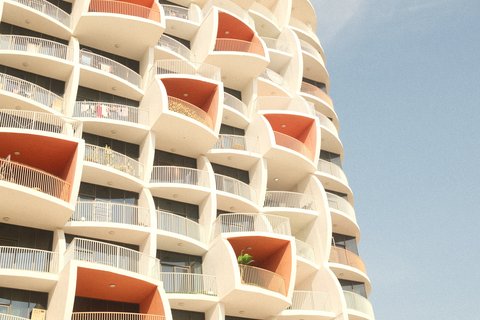
(Dreamy Expired Consumer Film Drift): Imagines a roll of consumer film shot years past expiration.
- Core Settings & WB: Uses Reala Ace, 6700K Kelvin with a +4 Blue shift, lowered Color, and held-back highlights.
- Texture & Best Light: Pairs deepened shadows, softened clarity and sharpness, Strong Large grain, and bright exposure for soft-light portraits.
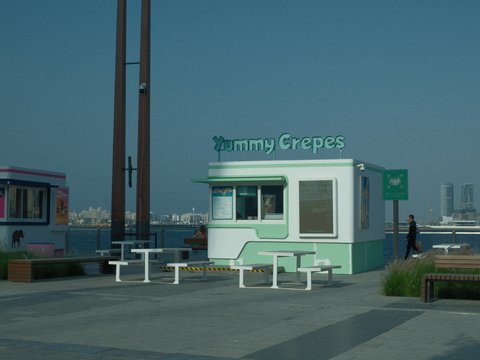
(Urban Exploration & Natural Portraits): Blends rich colors with subdued shadows on X-Trans V bodies.
- Core Settings & Look: Restrains bright sky highlights while using strong yet fine grain and natural Reala Ace skin rendering.
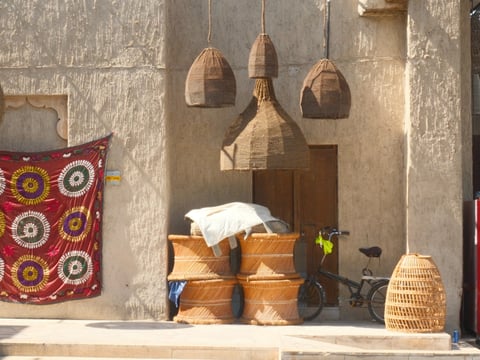
(Sunny Outdoor Portraits & Lush Greens): Channels classic Fujicolor Pro 160 print film in bright daylight.
- Core Settings & Look: Combines warm, vibrant colors where green foliage pops with soft contrast and subtle fine grain.
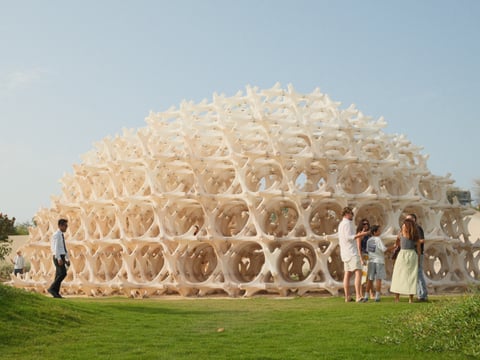
(Warm Kodak Vibe With Vivid Blues): Recalls classic Kodak daylight print stock on Reala Ace.
- Core Settings & Look: Pairs softened highlights, natural shadows, Strong Color Chrome FX Blue for vibrant skies, and fine grain.
Expired Reala Warmth pairs a 6700K white balance and +4 blue shift with strong large grain on Reala Ace.
Shoot an X100VI, X-T5, X-S20, or X-M5? Unlock all four Reala Ace setups on our Fujifilm Recipes page today.
Four Classic Chrome Recipes for Muted, Vintage Colour
To see how a Classic Chrome recipe contrasts against Reala Ace, compare these four fresh Chrome setups on FujiPic. Each recipe below uses short sentences and bullets to highlight how Classic Chrome handles golden hour and daylight.
Here are four fresh Classic Chrome recipes with their parameter highlights and best outdoor lighting:
- Kodak Atelier Reserve (Aged Golden Hour)
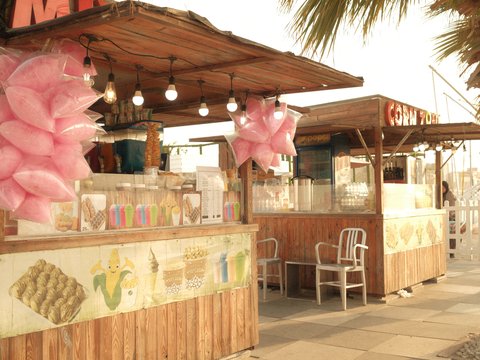
Built on Classic Chrome, Kodak Atelier Reserve gives everyday markets and coastal streets a warm, lived-in film character. It combines earthy warm tones and reduced contrast with a subtle cool-bluish white balance shift that softens the frame. Strong Large grain completes the expired-film texture, making golden-hour architecture look timeless straight out of camera.
Load Kodak Atelier Reserve (Classic Chrome, reduced contrast, cool-bluish shift, Strong Large grain) for aged golden-hour street texture.
- Southern Sun (Dreamy Golden-Hour Street)
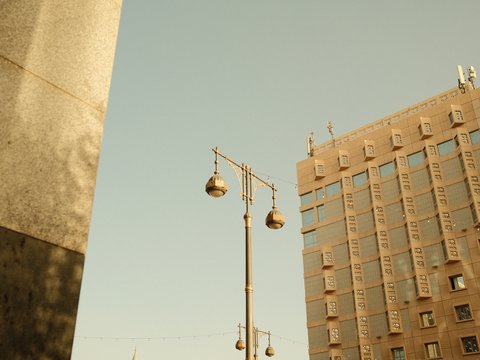
When late-afternoon sunlight wraps around neighborhood streets, Southern Sun turns Classic Chrome into a warm, whimsical storyteller. Strong color contrast makes subjects pop while softened highlights preserve a gentle, inviting atmosphere across faces and walls. Its Small grain setting adds subtle analog texture without overpowering architectural details during golden hour walks.
Load Southern Sun (Classic Chrome, strong color contrast, softened highlights, Small grain) for lively sunset travel.
- Portra Sol Chrome (Solarized Daylight Travel)

For sunny bridges, boats, and waterfront walks, Portra Sol Chrome blends Classic Chrome with warm solar highlights. It balances bright daylight exposure with deep teal-gray water and sky tones for vibrant summer travel.
Load Portra Sol Chrome (Classic Chrome, warm solar highlights, teal-gray balance) for bright waterfront travel.
- Soft Gold Retro (Overcast Nostalgic Warmth)
Under overcast clouds, Soft Gold Retro uses Noise Reduction minus four, Clarity minus three, and Weak Small grain. This warm shift transforms Classic Chrome’s cool base into nostalgic 1970s travel color.
Load Soft Gold Retro (NR -4, Clarity -3, Weak Small grain) for 1970s documentary warmth.
Portra Sol Chrome uses Classic Chrome to balance warm daylight highlights with deep teal-gray water and sky tones.
Read our 5 Best Fujifilm Golden Hour Recipes guide to compare more sunset setups across simulations.
Picking Reala Ace or Classic Chrome Across Five Scenes Now
Having both simulations on an X-Trans V body means you can match your slot to the exact lighting ahead. This Fujifilm simulation comparison checklist tells you which slot to pick in five everyday shooting situations.
Here is when to switch between your Reala Ace recipe slot and your Classic Chrome recipe slot:
- Outdoor Family & Environmental Portraits: Pick Reala Ace (Pro 160 Print or Pro Daylight Kodak) for natural, unshifted skin.
- Gritty Urban Markets & Signage: Pick Classic Chrome (Hard Light Chrome or Portra Sol Chrome) for teal-gray documentary punch.
- Soft Overcast or Window-Lit Daily Life: Pick Expired Reala Warmth (6700K, B +4) for airy, remembered print nostalgia.
- High-Contrast Midday Architecture: Avoid soft Reala Ace print recipes here; use Classic Chrome with DR400 to hold bright skies.
- All-Around One-Slot Travel: Load Worn Emulsion on Reala Ace when you want one slot that handles both people and streets.
Check our Fujifilm DR400 vs DR200 comparison guide to see why high-contrast midday sun demands DR400.
X-Processor 5 Exclusivity and Sensor Compatibility Rules
The biggest practical divide in Reala Ace vs Classic Chrome is which camera bodies actually carry both simulations. Checking our Fujifilm sensors directory before copying settings prevents missing-menu frustration on older fourth-generation cameras.
Here are the hardware compatibility rules and workarounds for shooting both looks across camera generations:
- Which Cameras Include Reala Ace: Only fifth-generation X-Processor 5 bodies (X100VI, X-T5, X-T50, X-S20, X-M5, GFX100 II) have Reala Ace.
- Why X-T4 and X100V lack it: Fourth-generation X-Processor 4 bodies cannot receive Reala Ace via firmware updates.
- Approximating Reala Ace on X-Trans IV: Start with PRO Neg. Std, boost Color +1, and enable FX Blue Weak.
- Approximating Classic Chrome From Reala Ace: Lower exposure, shadows, and saturation slightly while shifting blues greener and oranges redder.
Need to adapt a fourth-generation Classic Chrome recipe onto your X100VI or X-T5? Use our free Fujifilm Recipe Converter now.
Reala Ace or Classic Chrome: Which Should You Choose?
Fujifilm shooters have plenty of ways to shape straight-out-of-camera JPEGs, yet few contrasts feel as distinct as pairing true-to-life accuracy with muted documentary grit. Reala Ace keeps colours natural, skin tones balanced, and everyday scenes looking true to life.Classic Chrome takes a more restrained approach, with muted colours, deeper shadows, and a distinctive documentary feel.
Choose Reala Ace for portraits, family moments, and everyday photography where natural colour matters. Pick Classic Chrome for street photography, travel, and scenes that benefit from a cooler, more understated look.
You don’t have to settle for just one. Keep a Reala Ace recipe for natural colours and a Classic Chrome recipe for moodier scenes. Switch between them depending on the light and the story you want your photos to tell.
Before saving either recipe, check that your Fujifilm camera supports the required film simulation.
Stop settling for the default look. Explore FujiPic’s Fujifilm recipe library, compare real sample photos, and find a recipe worth taking on your next shoot.
Frequently Asked Questions
1. What Is the Difference Between Reala and Chrome?
Reala Ace is modeled on Fujicolor Superia Reala Ace 100 negative film, delivering true-to-eye colors and lifted midtones. Classic Chrome is modeled on mid-century photojournalism magazine slides, producing deeper shadows, held-back magenta, and teal-leaning blues. Choose Reala Ace for honest everyday color and portraits, or choose Classic Chrome for moody documentary street work.
2. Which Fujifilm Cameras Have Reala Ace Built In?
Reala Ace is exclusive to fifth-generation cameras powered by X-Processor 5 across both X-Trans V and GFX lines. Supported models include the X100VI, X-T5, X-T50, X-E5, X-T30 III, X-S20, X-M5, X-H2, X-H2S, GFX100 II, and GFX100RF. You can verify your exact camera body’s supported simulations anytime on our Fujifilm Cameras page.
3. What Is the Best Reala Ace Recipe on FujiPic?
If you are after dreamy, expired consumer film nostalgia with a 6700K (+4 Blue) drift, load Expired Reala Warmth first. Sunny outdoor portraits where greens and skin glow naturally call for Pro 160 Print or Pro Daylight Kodak. And for all-around urban walks with restrained highlights and fine grain, load Worn Emulsion into slot C1.
4. Can I Get Reala Ace on a Fujifilm X-T4 or X100V?
No, fourth-generation cameras like the X-T4, X100V, X-Pro3, and X-S10 run on X-Processor 4 and cannot load Reala Ace. However, because Reala Ace shares tonal DNA with PRO Neg. Std, you can get very close on older bodies. Select PRO Neg. Std, add Shadow plus 0.5 and Color plus one, or use our verified X-Trans IV recipes.
5. Why Do People Prefer Reala Ace Over Provia?
Many photographers feel standard Provia renders blues and contrast a bit too aggressively, resembling a modern smartphone file. Reala Ace keeps colors accurate to the eye while softening highlight roll-off and giving blues a calmer analog hue. It acts as a true all-purpose standard film simulation that never looks cheap or overly digital straight out of camera.
6. Which Simulation Is Better for Portrait Skin?
Reala Ace wins for portrait skin tones because its negative-film base keeps complexions natural even under vintage color shifts. Recipes like Expired Reala Warmth and Pro Daylight Kodak flatter faces in open shade and gentle window light. Classic Chrome can look slightly pale or cool on skin unless you add a warm red-yellow white balance shift.
7. Why Avoid High Contrast With Reala Ace Recipes?
Print-inspired setups like Expired Reala Warmth, Pro 160 Print, and Worn Emulsion rely on soft tonal transitions. Shooting them under harsh midday sun with deep black shadows and bright white skies can clash with their gentle character. Save those Reala Ace print recipes for open shade, golden hour, or overcast walks, and use Classic Chrome at noon.
8. How Can I Match Any Photo to a Reala Ace Look?
If you see a street or portrait photograph with colors you love, open our visual matcher at FujiPic Find. Upload that reference image and let the tool analyze its highlight roll-off, shadow density, and color warmth. It will immediately rank the closest Reala Ace and Classic Chrome recipes from our ninety-one recipe library.