Fujifilm X100VI Recipes: 9 Best Settings to Load First
Fujifilm X100VI recipes encompassing streetscapes, landscapes, black-and-white photography, highlighting Reala Ace, Velvia configurations.
Getting a new X100VI is exciting, but those first few days can bring one tiny problem: too many settings. One recipe looks perfect in a sample photo, another sounds great for street shots, and suddenly you are scrolling through menus wondering where to begin.
That is exactly what this guide is here for. We have kept the recipes simple, useful, and easy to try, so you can pick one, load it, and start taking photos without overthinking every shot.
Whether the plan is a morning walk, a weekend trip, a few portraits, or everyday snapshots, there is a recipe here to try.
What Makes the X100VI Different From Older Fujifilm Recipes?
The X100VI uses X-Trans V, the same generation found inside the X-T5 and X-H2, unlike the X100V’s X-Trans IV.
This newer sensor generation adds Reala Ace and broader Color Chrome choices, while grain and detail can render differently.
Here’s exactly what’s new.
- Reala Ace simulation: Reala Ace gives you a new color starting point, especially useful for natural-looking everyday JPEG recipes.
- It matters because X100VI recipes can now start with a Film Simulation the older X100V simply never had.
- That makes it easier to build a look without trying to force an older recipe into something unfamiliar.
- Finer grain control: Finer grain control lets you shape film texture more carefully, so JPEGs can look cleaner or noticeably rougher.
- The X100VI still gives you grain size and strength controls, making texture changes quick and easy.
- That extra control helps when creating separate looks for bright streets, portraits, or darker evening scenes.
- Physical Film Dial: Physical Film Dial controls make recipe switching quicker, with dedicated dials and C1-C7 custom settings close at hand.
- Recipes saved into custom settings can be recalled quickly, so changing looks takes fewer menu steps while shooting.
- This becomes useful when light changes suddenly and stopping to search through menus would make you miss a moment.
- 40MP resolution: 40MP resolution captures 40.2MP of detail, making sharpening, texture, and added grain easier to notice in JPEGs.
- The higher resolution means small recipe changes can show more clearly when photographs are viewed closely later.
- That can make an older recipe feel slightly too sharp, too grainy, or simply different on this camera.
That is why an X100V recipe copied directly onto an X100VI often looks subtly different.
Looking for a fresh look for your next photo walk? Explore Fujipic’s X100VI collection and find a recipe worth trying.
The 3 Best Fujifilm X100VI Recipes for Everyday Shooting
These three FujiPic recipes give you different everyday looks, from warm film colour to cleaner and more nostalgic JPEGs.
Each one is already listed by FujiPic as tested on the X100VI, so there is no guesswork about camera compatibility.
Load these three first, then branch into genre-specific looks below.
Expired Reala Warmth | Reala Ace
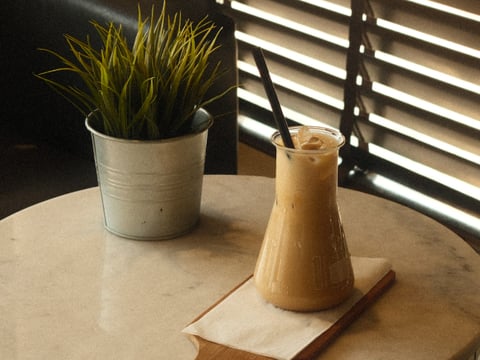
This FujiPic recipe gives everyday photos a softer, warmer feel while keeping the colours from becoming too loud.
| Parameter | Setting |
| Film Simulation | Reala Ace |
| Dynamic Range | DR400 |
| Highlight | -1.5 |
| Shadow | +1.5 |
| Color | -2 |
| WB Shift | Custom 6700K, R +1 / B +4 |
| Grain | Strong, Large |
Best for: Everyday walks, relaxed portraits, buildings, travel snapshots, and warm outdoor light.
Kodak Softlight | Classic Chrome

Kodak Softlight keeps colours lively but gentle, with softer highlights that work nicely for normal daytime shooting.
| Parameter | Setting |
| Film Simulation | Classic Chrome |
| Dynamic Range | DR400 |
| Highlight | -1.5 |
| Shadow | -1 |
| Color | +3 |
| WB Shift | Auto White Priority, R +2 / B -4 |
| Grain | Weak, Small |
Best for: Daily life, cafés, travel, street scenes, and outdoor photos where warmth and colour matter.
Kodak Sunwashed | Nostalgic Neg.

Kodak Sunwashed gives everyday scenes warmer colour, deeper shadows, and a stronger old-film feeling straight from the camera.
| Parameter | Setting |
| Film Simulation | Nostalgic Neg. |
| Dynamic Range | DR400 |
| Highlight | -1 |
| Shadow | +2 |
| Color | +3 |
| WB Shift | Custom 4500K, R +2 / B -5 |
| Grain | Strong, Large |
Best for: Markets, cafés, travel days, golden-hour walks, and colourful scenes with a vintage feel.
Want to know when your Fujifilm JPEG is good enough without editing? Read our Fujifilm JPEG vs RAW: Do You Really Need to Edit? guide for a simple breakdown.
Best X100VI Recipes for Street Photography
Street photography benefits from recipes that give ordinary places more character without making every frame look overworked.
Vintage Amber | Classic Negative

Vintage Amber adds strong colour and warm character, while DR400 helps keep bright areas under control in contrasty streets.
| Parameter | Setting |
| Film Simulation | Classic Negative |
| Dynamic Range | DR400 |
| Highlight | -1.5 |
| Shadow | +2.5 |
| Color | +4 |
| WB Shift | Fluorescent 1, R +1 / B -6 |
| Grain | Weak, Large |
Best for: City streets, cafés, architecture, golden-hour walks, and colourful urban scenes.
Night Reversal | Velvia
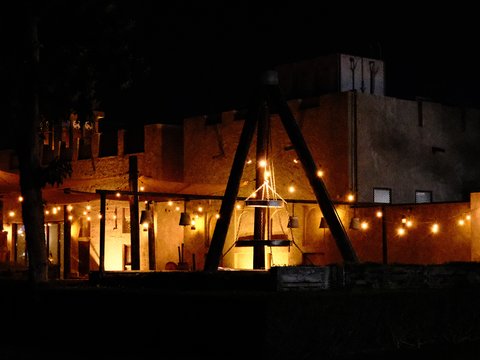
Night Reversal uses Velvia for rich colour and stronger contrast, making lights, buildings, and evening scenes stand out.
| Parameter | Setting |
| Film Simulation | Velvia |
| Dynamic Range | DR400 |
| Highlight | +1 |
| Shadow | +1 |
| Color | +2 |
| WB Shift | Auto, R +2 / B -2 |
| Grain | Strong, Small |
Best for: Evening streets, illuminated buildings, colourful signs, golden hour, and dramatic outdoor scenes.
Planning to take the X100VI out after dark? Our guide to 8 Must-Try Fujifilm Night Photography Recipes covers city lights, neon, mixed lighting, and low-light shooting.
Best X100VI Recipes for Travel and Landscape
Travel recipes need a little more colour and atmosphere when the scene includes skies, greenery, coastlines, or wide open views.
Warm Monsoon Light | Velvia
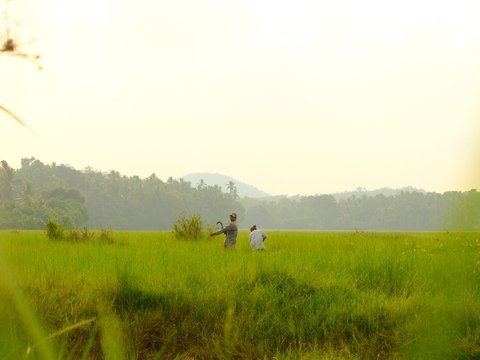
Warm Monsoon Light pushes greens and warm colours forward, making natural landscapes feel bright and full of life.
| Parameter | Setting |
| Film Simulation | Velvia |
| Dynamic Range | DR400 |
| Highlight | -1.5 |
| Shadow | -1 |
| Color | +3 |
| WB Shift | Auto White Priority, R +2 / B -4 |
| Grain | Weak, Small |
Best for: Green landscapes, mountains, countryside, coastal scenes, golden hour, and colourful outdoor travel photos.
Bleached City Tone | Eterna Bleach Bypass

Bleached City Tone gives architectural and travel scenes a darker, more cinematic look with muted colour and strong texture.
| Parameter | Setting |
| Film Simulation | Eterna Bleach Bypass |
| Dynamic Range | DR400 |
| Highlight | 0 |
| Shadow | -2 |
| Color | -2 |
| WB Shift | Custom 4000K, R 0 / B -5 |
| Grain | Strong, Small |
Best for: Modern architecture, moody city scenes, dramatic travel images, and places where colour is not the main attraction.
Best X100VI Recipes for Black-and-White Shooting
Black-and-white recipes make the X100VI especially fun when shapes, shadows, textures, and light matter more than colour.
Acros Smoke Tone | Acros

Acros Smoke Tone gives black-and-white photos deep tones, visible grain, and a strong textured look that suits architecture and streets.
| Parameter | Setting |
| Film Simulation | Acros |
| Dynamic Range | DR400 |
| Highlight | 0 |
| Shadow | -2 |
| Color | -2 |
| WB Shift | Custom 4000K, R 0 / B -5 |
| Grain | Strong, Small |
Best for: Architecture, urban scenes, street photography, textured subjects, and dramatic black-and-white work.
How to Load These Recipes Using the X100VI’s Film Dial?
The X100VI’s control ring, rather than a separate Film Dial, lets you change Film Simulation without opening menus. It can be assigned to Film Simulation through Button/Dial Setting, giving recipe changes a handy physical control.
Here’s how to set it up.
- Assign Film Simulation: Open Button/Dial Setting, choose Control Ring Setting, then select Film Simulation for the ring.
- Save your recipes: Save each finished recipe to C1-C7 using the normal custom setting save process.
- Choose three simulations: Set Film Simulation Bracketing with up to three simulations, such as Provia, Astia, and Classic Chrome.
- Group similar looks: Group similar looks together when choosing those three bracketing options for quicker comparisons while shooting.
- Change looks quickly: Rotate the control ring while powered on to change Film Simulation before taking your next shot.
Browse every X-Trans V compatible recipe on FujiPic for more ready-to-load ideas.
Reala Ace: Should You Build Your Main Recipe Around It?
REALA ACE is designed for faithful color reproduction with slightly harder tonality than PROVIA, giving everyday scenes a firmer character.
It is exclusive to newer X-Trans V bodies like the X100VI, giving recipe builders another modern color foundation.
Here’s when it earns the top slot, and when it doesn’t:
Choose Reala Ace if:
- It keeps familiar colors feeling natural while adding firmer contrast, which works beautifully for everyday photos and changing light.
- It suits photographers who want one dependable recipe for travel, family moments, streets, and scenes with plenty of color.
Choose Classic Negative or Classic Chrome instead if:
- You prefer a more obvious character, with a stronger mood, softer color, or a more documentary feeling straight from camera.
- Your photos need a recipe built around stronger contrast and personality rather than faithful color across different subjects and lighting.
Try both on the same subject before permanently giving one of your C-slots to either recipe.
X100VI vs X100V : Do the Same Recipes Work on Both?
Mostly, X100V recipes work on X100VI, but not identically, because these cameras use different sensor generations. X-Trans IV and X-Trans V process color and grain slightly differently, even when matching numeric settings exactly.
Here’s how the two cameras compare when you move recipes between them.
| Feature | X100V (X-Trans IV) | X100VI (X-Trans V) |
| Reala Ace availability | Not available | Available, with 20 Film Simulation modes |
| Resolution | 26.1MP X-Trans CMOS 4 sensor | 40.2MP X-Trans CMOS 5 HR sensor |
| Grain rendering | Older X-Trans IV processing and lower resolution shape the final texture | Newer processing and higher resolution can make fine texture appear more defined |
| Film Dial | No dedicated Film Dial; control ring can be assigned to Film Simulation | No dedicated Film Dial; control ring can be assigned to Film Simulation |
The practical rule is simple: sensor generation determines recipe compatibility, so start with matching settings before fine-tuning the final look.
End Notes
These nine recipes cover everyday, street, travel, landscape, and black-and-white shooting on your new X100VI. Together, they give you starting points for different light, subjects, moods, and moments each week.
Now load one, head outside, and start shooting instead of changing settings around inside menus. Keep the recipes that feel right, then adjust anything that does not match your taste. One may become your everyday favourite, while another becomes your recipe for special weekend trips.
Small changes make a big difference, so trust your eyes and keep experimenting with recipes. Your next favourite X100VI look might be waiting there, ready for your next weekend walk.
When another look catches your eye, browse FujiPic’s X-Trans V recipes and try something new.
FAQs
1. What is a Fujifilm recipe on the X100VI?
A Fujifilm recipe is a saved combination of Film Simulation, white balance, grain, tone, color, and other settings. These settings work together to create one JPEG look, then C1 through C7 can recall that recipe quickly whenever needed.
2. Do X100V recipes work on the X100VI?
Most X100V recipes work on the X100VI, but they may look different because X-Trans IV and X-Trans V render images differently. Recipes using unavailable simulations, especially Reala Ace, need changes, while Classic Chrome or Classic Negative recipes transfer more easily.
3. What is Reala Ace on the X100VI?
Reala Ace is Fujifilm’s Film Simulation for faithful colors with firmer contrast, making it useful for natural everyday photos. It works especially well for travel, people, and colorful scenes when you want lively pictures without heavy color effects.
4. How many recipes can you save on the X100VI?
The X100VI can save seven custom recipe slots, labeled C1 through C7, so several favorite looks stay ready. Each C slot stores a group of camera settings, letting you recall a complete recipe quickly through the Q menu.
5. Do Fujifilm recipes affect RAW files on the X100VI?
No, recipes mainly change JPEG rendering, while RAW files keep the underlying captured image data for later processing. You can also use Film Simulation settings during the X100VI’s in-camera RAW conversion, creating a new processed file afterward.
6. What is the best starter recipe for a new X100VI owner?
A great starter recipe is Classic Negative with DR200, Highlight -1, Shadow -1, Color +1, and gentle grain. It gives everyday photos a little warmth and character, while remaining simple enough for streets, walks, travel, and family shots.
7. How does the Film Dial differ from C1-C7 on the X100VI?
The X100VI has no dedicated Film Simulation Dial; its control ring can instead be assigned to Film Simulation. The C1-C7 slots save complete custom setting groups, while the control ring simply changes the selected shooting function.
8. Do Fujifilm recipes need updating after an X100VI firmware update?
Usually, recipes do not need rewriting after every firmware update, but checking your saved settings afterward remains sensible.
Fujifilm has published X100VI updates addressing Custom Setting behavior, so recipe users should review their C-slots after major updates.